Notion replaceAll Automation: 7 Smart Self-Erasing Triggers
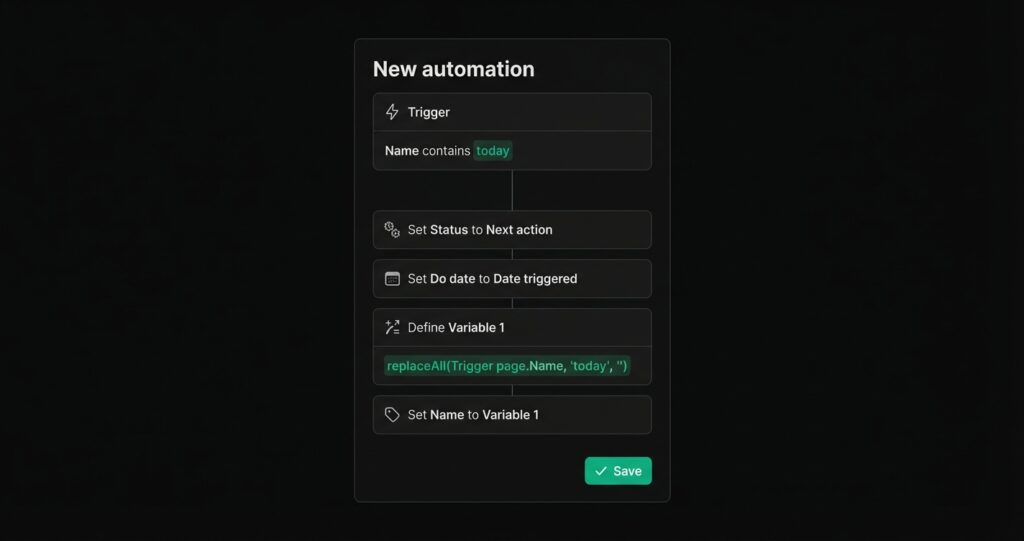
A Notion replaceAll automation triggers an action when a task title contains a specific string, runs your actions (set status, set date, add a tag), then erases the trigger string from the title so the task reads cleanly. It turns your task title into a command line. Type today into a new task and the task auto-schedules itself — with today removed from the title.
This guide shows 7 self-erasing triggers you can build with a Notion replaceAll automation: one-tap today, GTD hashtags like #na and #wf, priority markers, and an iOS Siri Shortcut to create tasks by voice.
What is a Notion replaceAll automation?
A Notion replaceAll automation is a database automation that listens for a keyword in the Name (title) property, performs one or more actions, then uses the replaceAll() formula to strip the keyword out of the title.
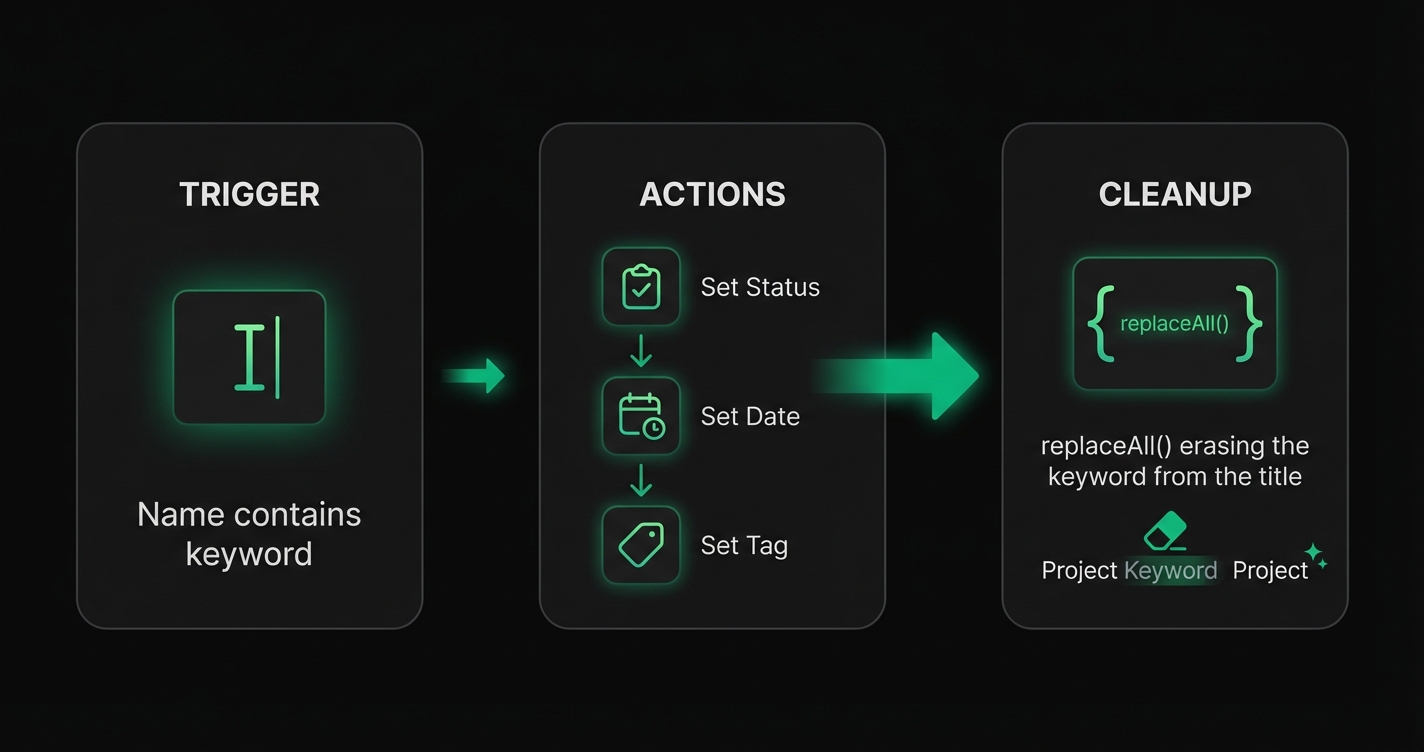
The anatomy is always the same:
- Trigger:
Name contains "<keyword>" - Actions: Set Status, Set Date, Set Select/Multi-select — whatever the keyword represents
- Clean-up:
Define variable → replaceAll(Trigger page.Name, "<keyword>", "")→Set Name to that variable
Without the clean-up step, the keyword stays in the title forever and the automation re-fires on every edit. The replaceAll call is what makes the trigger self-erasing.
Use case 1: Type "today" to auto-schedule a task
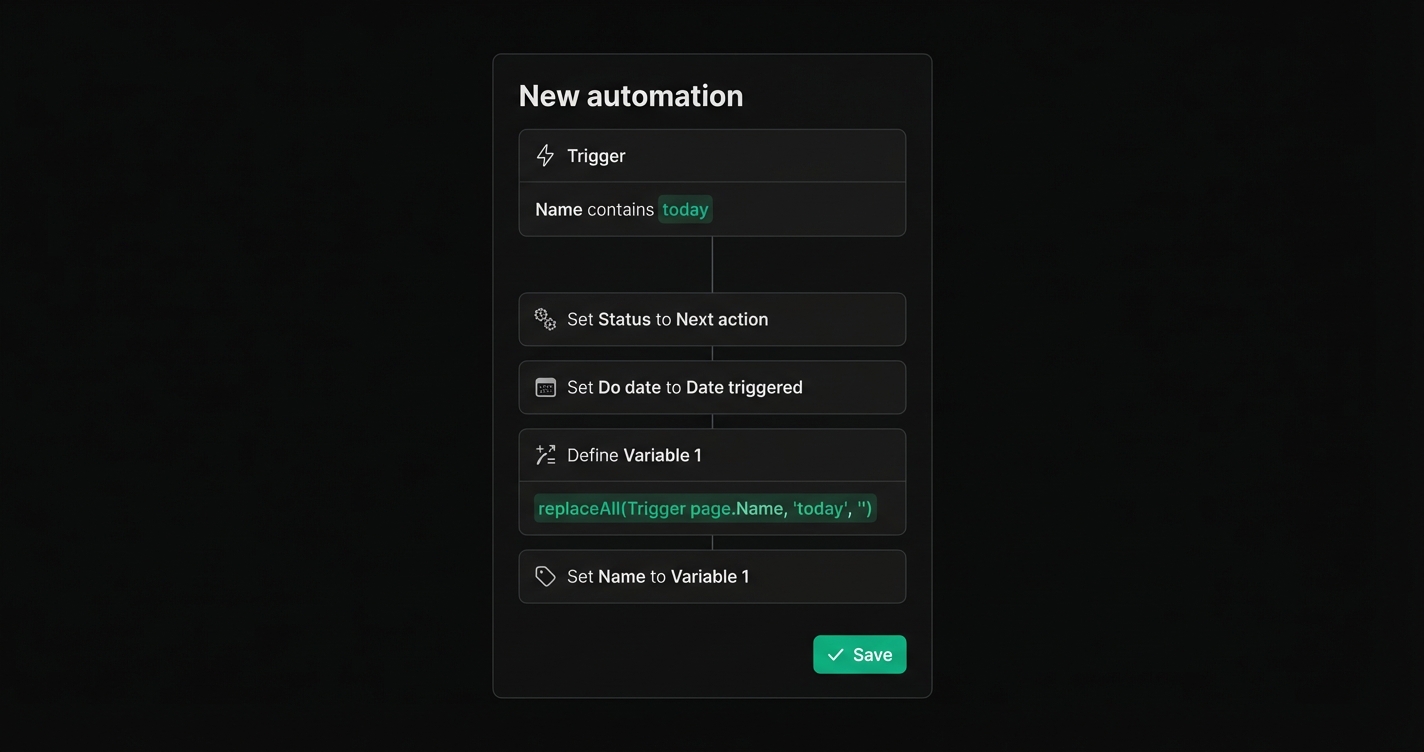
Open any Notion task database, type today anywhere in the title, and the task schedules itself for today's date and moves to Next action status. The word today disappears the moment the automation fires.
Automation config:
- Trigger:
Name contains "today" - Action 1:
Set Status to "Next action" - Action 2:
Set Do date to Date triggered - Action 3:
Define Variable 1 = replaceAll(Trigger page.Name, "today", "") - Action 4:
Set Name to Variable 1
Combine this with an iOS Siri Shortcut that calls Notion's Add to database action and you get voice-created tasks that auto-schedule. Tell Siri "Add task call dentist today" — the task lands in your Notion inbox with Do date = today and clean title "call dentist".
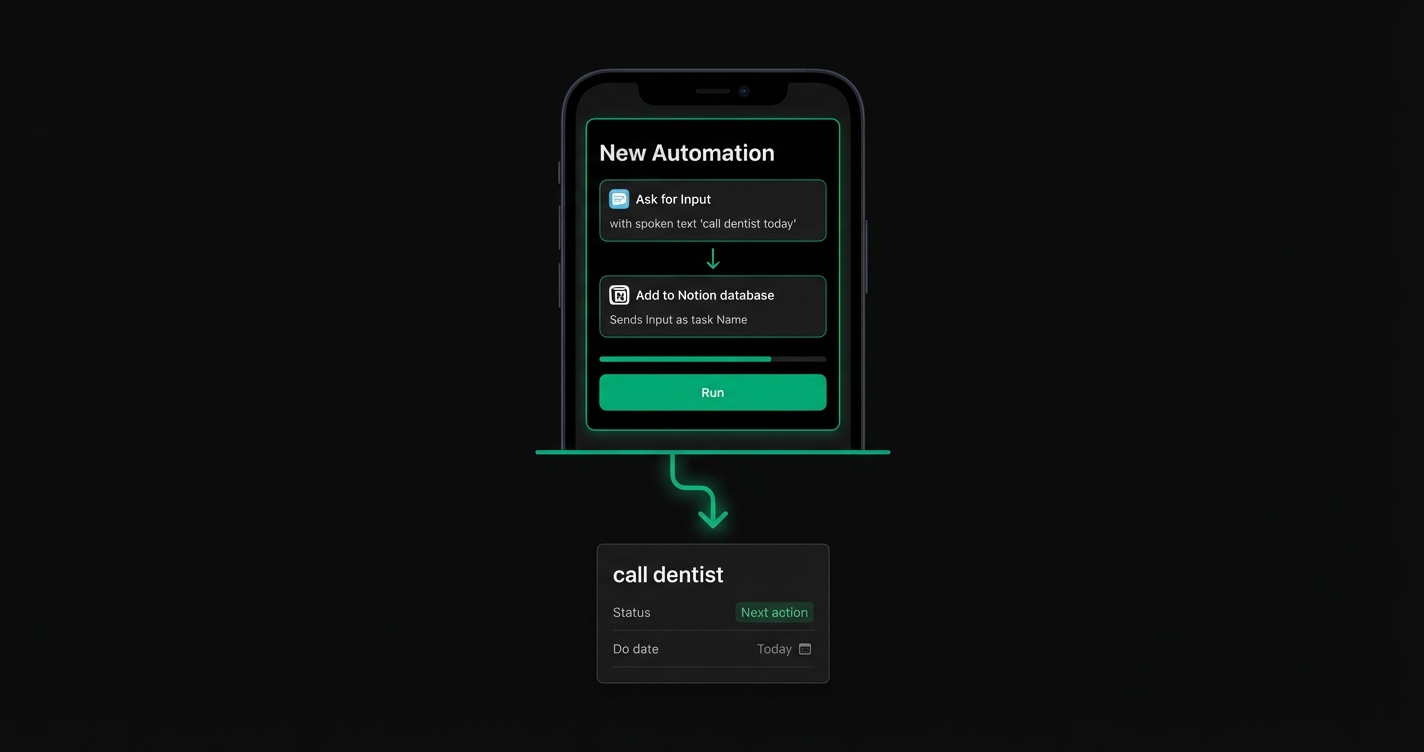
For the shortcut itself, use the official Notion iOS Shortcuts integration and pass the spoken input as the task Name. The Notion replaceAll automation handles the rest server-side.
Use case 2: Hashtag triggers for GTD status
If you run a Getting Things Done workflow, your tasks need statuses like Next action, Waiting for, and Agenda. Selecting them from a dropdown is friction. A Notion replaceAll automation lets you set the status by typing a hashtag.
| Type this | Status set | Hashtag erased |
|---|---|---|
#na | Next action | ✓ |
#wf | Waiting for | ✓ |
#agenda | Agenda | ✓ |
#someday | Someday | ✓ |
#inbox | Inbox | ✓ |
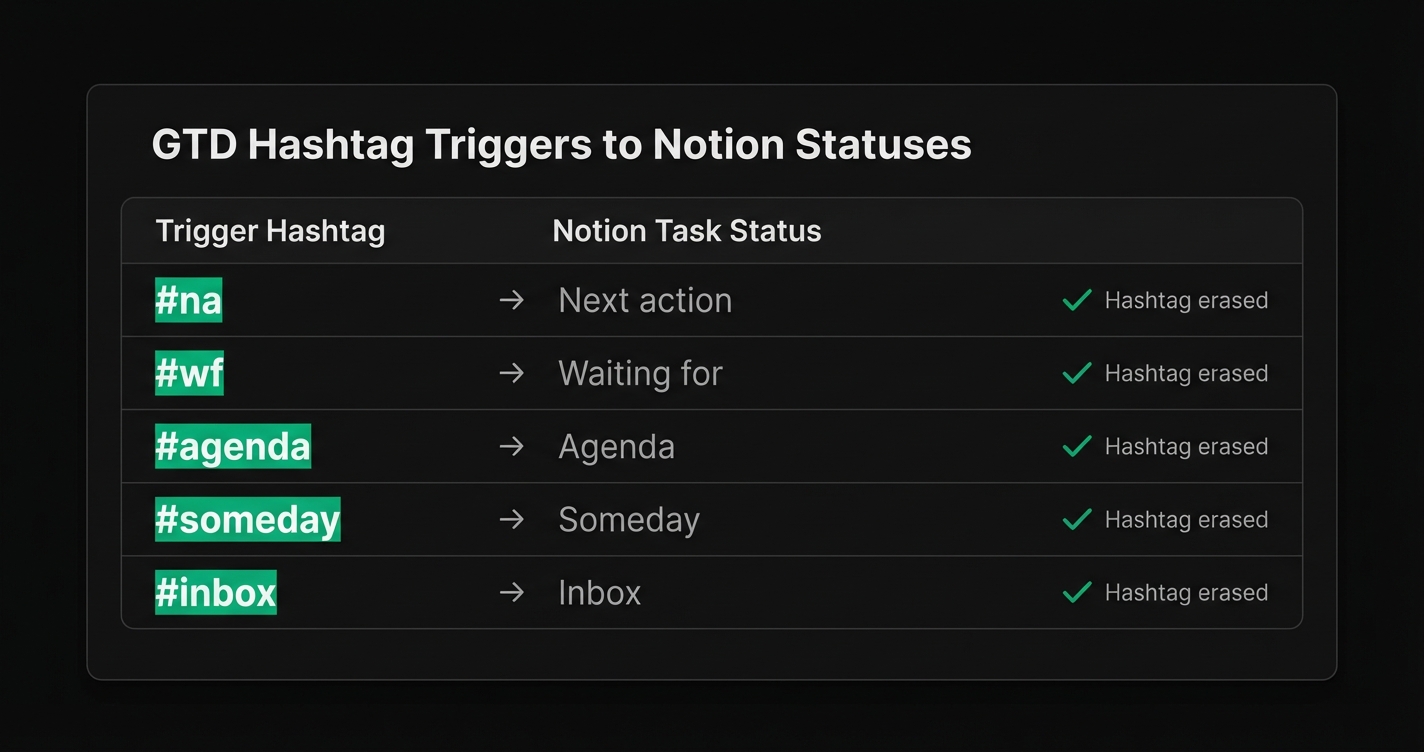
Build one automation per tag with the same three-step pattern: trigger → set status → replaceAll(Trigger page.Name, "#na", "") → set Name. Five automations, zero friction.
How to build your first Notion replaceAll automation
Here is the step-by-step HowTo for one self-erasing trigger. Once you have built one, cloning it for the rest takes 30 seconds each.
- Open the database automations panel. In any Notion database, click the ⚡ icon in the top right and select New automation.
- Add the trigger. Choose Page property edited → Name → contains → type your trigger string (e.g.
today). - Add the primary action. Click + Add action. Pick the outcome: Edit property → Status → Next action, or Edit property → Do date → Date triggered.
- Define the clean-up variable. Click + Add action → Define variables. Name it
Variable 1. Set the formula toreplaceAll(Trigger page.Name, "today", ""). - Apply the cleaned name. Add one more action: Edit property → Name → Variable 1.
- Turn the automation on and test by typing
todayin a new task.
That is it. Your first Notion replaceAll automation now fires every time today lands in a task title, schedules the task, and erases the trigger word.
Advanced Notion replaceAll automation patterns
Once the basic pattern clicks, stack more triggers for power use:
.async— Set Medium = Async, strip.asyncfrom the name. Useful for tagging communication channel on the fly.@alex— Set Assignee = Alex, strip@alexfrom the name. Chain multiple assignee triggers for your team.!!— Set Priority = High, strip!!. Use!!!for Urgent,!for Low..30m— Set Estimate = 30 minutes, strip.30m. Great for time-blocking.- Chained replaceAll — Nest calls:
replaceAll(replaceAll(Trigger page.Name, "#na", ""), "today", "")— handles two triggers in one automation if both fire.
Each pattern is one more Notion replaceAll automation on the same database. They compose cleanly because each one only touches its own trigger string.
Common pitfalls
Three things break a Notion replaceAll automation more often than anything else:
- Case-sensitivity.
replaceAllis case-sensitive.Todaywill not match a trigger that looks fortoday. Normalize withreplaceAll(lower(Trigger page.Name), "today", "")if voice input gives you capitalized words. - Leading and trailing whitespace. After stripping the trigger, you are left with a stray space. Wrap the result in
trim()inside your variable:trim(replaceAll(Trigger page.Name, "today", "")). - Overlapping triggers. If
todayandtoare both triggers, typingtodayfires both and strips the wrong text. Make trigger strings distinct — prefer hashtags or periods (#na,.async) to avoid collisions with normal English words.
FAQ
What is replaceAll in Notion?
replaceAll is a Notion formula function that takes a text field, a string to search for, and a replacement string, then returns the text with every occurrence of the search string replaced. A Notion replaceAll automation uses this function to erase trigger keywords from a task title after the automation fires.
How do I trigger a Notion automation from the task name?
Open the database automations panel, create a new automation, and set the trigger to Page property edited → Name → contains. Enter your keyword. Notion fires the automation every time a task title contains that keyword.
Does the trigger text stay in the task title?
Not if you add the replaceAll clean-up step. Define a variable that runs the replaceAll formula on the trigger page Name, using your keyword as the search string and an empty string as the replacement, then set the Name property to that variable. The trigger text is erased the moment the automation fires.
Can I use a Notion replaceAll automation with Siri Shortcuts?
Yes. Build an iOS Shortcut that calls Notion’s Add to database action with your spoken input as the task Name. If the input contains your trigger word (e.g. today), the Notion replaceAll automation runs server-side and both sets the date and erases the word.
Why doesn’t my replaceAll automation fire?
Three common causes: the automation is turned off, the trigger string is case-sensitive and your input is capitalized differently, or you edited the Name property through an integration that bypasses Notion’s automation engine. Check the automation is active, use lower() to normalize case, and test with a manual edit first.
Start building your self-erasing shortcuts
A Notion replaceAll automation costs 2 minutes to build and pays back every single time you create a task. Pick one trigger that reduces friction for you right now — today, #na, !! — and build it. Once you have one, cloning it for the next five is trivial.
Indie maker and developer. Building productivity tools and writing about systems, automation, and the craft of focused work.
Want a custom Notion template?
Browse my ready-made tools or get in touch for a custom build.