Claude Code Automation 2026: Build a Powerful AI Developer
What if you could assign a coding task to an AI — and wake up to a finished pull request?
That is exactly what Claude Code automation makes possible. I built a system where clicking a button in Notion triggers an autonomous AI developer. It clones my repository, writes code, validates its work, and creates a GitHub PR — all while I am focused on something else entirely.
This is not another "install Claude Code on a VPS" tutorial. Those already exist, and they are excellent. This is about what happens after the setup: turning Claude Code automation into a genuine async workflow where your project management tool drives the AI.
The result? A Notion-powered coding agent with three distinct modes — autonomous code generation, knowledge base ingestion, and in-context Q&A — running on a budget VPS.
The Problem: AI That Waits for You
Most developers use Claude Code interactively. You open a terminal, type a prompt, watch it work, and iterate. That is powerful, but it means the AI only works when you work.
I wanted something different. My task board in Notion already defines what needs to be done. Why could an AI not pick up those tasks and deliver results asynchronously?
The vision for my Claude Code automation setup was simple:
- Write a task in Notion with a prompt and a linked repository
- Click a button
- Come back later to a PR ready for review
No terminal. No babysitting. Just results.
How the Claude Code Automation Pipeline Works
The system runs as a Fastify server on a Hetzner VPS, managed by systemd. Here is the end-to-end flow:
Notion Button → KanBan status "Async"
  → Webhook POST to runner server
  → Read task + resolve repository from Notion entity
  → Clone repo → spawn Claude Code CLI
  → Validate output → create GitHub PR
  → Update Notion task with PR link
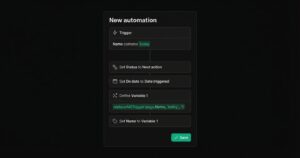
When I mark a task as "Async" in my Notion KanBan board, a Notion automation fires a webhook to my server. The server reads the task, resolves the linked repository from a Notion entity relation, and spawns an isolated job.
Each job runs in its own directory with a unique ID. The server tracks status, streams logs to disk, and enforces timeouts. When the job completes — or fails — it updates the Notion task with the result.
Key Infrastructure Decisions
systemd over tmux. Most Claude Code automation guides recommend tmux for persistent sessions. I chose systemd because it auto-restarts on crashes, integrates with journalctl for centralized logging, and starts automatically on boot. For a production Claude Code automation service, systemd is the right choice.
Fastify over Express. Fastify v5 provides built-in rate limiting, request schema validation, and significantly better throughput. The server handles Notion webhooks, status API endpoints, and log streaming.
SSH-based git operations. The runner automatically converts HTTPS GitHub URLs to SSH format. Headless VPS environments cannot handle browser-based git authentication, so SSH keys are the only reliable path.
The Three Modes of Claude Code Automation
What sets this system apart from a simple "run Claude Code remotely" setup is that it operates in three distinct modes, each with tailored tool permissions and safety boundaries.
Mode 1: Run — Autonomous Code Generation
This is the core Claude Code automation feature. A Notion task triggers a full code generation cycle:
claude -p "${PREAMBLE}"
  --output-format json
  --max-turns 15
The preamble includes the task title, detailed prompt, repository context, and instructions for creating a branch with the Notion task ID — for example, feat/TSK-17250-add-csv-export.
After Claude Code finishes, the runner:
- Checks for merge conflicts against
origin/main - Runs test commands if configured (
npm test,composer test) - Creates a GitHub PR with the TSK-ID in the title
- Updates the Notion task with the PR URL and job cost
The TSK-ID in the PR title automatically links back to the Notion task through a GitHub integration — creating a bidirectional connection between your task board and your codebase.
Mode 2: Comment — Q&A Inside Notion
This is my favorite Claude Code automation feature. Type #claude in a Notion comment on any task, and the system responds with an answer grounded in the actual repository code.
claude -p "${COMMENT_PREAMBLE}"
  --allowedTools "Read,Glob,Grep,Bash(ls:*),Bash(find:*)"
  --output-format json
  --max-turns 15
Notice the restricted tool set. Comment mode is read-only — Claude can search and read files but cannot edit anything. You can safely ask questions like "How does the auth middleware work?" or "What tests cover the payment flow?" and get accurate answers from the actual code.
The runner caches cloned repositories per Notion page with a configurable TTL, so follow-up questions skip the clone step. It also maintains conversation history for multi-turn interactions.
Mode 3: Ingest — An AI That Learns
The third Claude Code automation mode targets a personal knowledge base repository. Instead of creating PRs, it commits directly to main:
claude -p "${INGEST_PREAMBLE}"
  --max-turns 10
I use this after completing projects: lessons learned, client details, debugging patterns, and architecture decisions. The AI reads the existing knowledge base structure and integrates new information into the right files, following the repository conventions.
Over time, this creates a growing knowledge base that informs future Claude Code automation runs — the agent becomes more effective as it learns your patterns.
Security: Webhooks, Auth, and Tool Restrictions
Running autonomous AI agents demands careful security design. Here is how the Claude Code automation system handles it.
Webhook verification. Notion sends an HMAC-SHA256 signature with every webhook. The server verifies it with timing-safe comparison to prevent timing attacks:
const computed = crypto
  .createHmac('sha256', webhookSecret)
  .update(rawBody)
  .digest('hex');
if (!timingSafeEqual(Buffer.from(hash), Buffer.from(computed))) {
  return reply.code(403).send({ error: 'Invalid signature' });
}
API authentication. All endpoints except /health require an x-api-key header or a whitelisted IP address.
Per-mode tool restrictions. Run mode gets full tool access. Comment mode is strictly read-only. Ingest mode gets write access only to the knowledge base repo. This is the principle of least privilege applied to AI agents.
Timeout and kill protection. Every job has a configurable timeout — 30 minutes by default. If a job exceeds it, the server kills the entire process group with SIGTERM and marks the job as timed out.
Merge conflict detection. Before creating a PR, the runner tests a merge against origin/main. If conflicts exist, the job fails explicitly rather than creating an unmergeable PR.
Prerequisites: Standing on the Shoulders of Great Guides
I will not repeat what is already well-documented. For the infrastructure foundation of your Claude Code automation setup:
- VPS setup: Andrey Markin's comprehensive guide covers Hetzner provisioning, Tailscale VPN, tmux, firewall, and mobile access
- Headless OAuth: Coen Jacobs' gist explains generating long-lived tokens for headless VPS environments
- Claude Code CLI reference: The official Anthropic docs cover all CLI flags, CLAUDE.md configuration, and headless mode
With those in place, the Claude Code automation layer adds a Fastify webhook server (Node.js 20+), Notion API integration, shell scripts per mode, job metadata persistence, and GitHub CLI for PR creation.
Total infrastructure cost: a VPS at around $5-10 per month plus your existing Claude subscription. No additional SaaS fees.
Lessons Learned After 3 Months
Running Claude Code automation in production since January 2026 has taught me several important lessons.
Start with small, well-defined tasks. Claude Code automation delivers the best results when the task is tightly scoped. "Add CSV export to the users endpoint" beats "Refactor the entire API." The more specific your Notion task prompt, the better the resulting PR.
CLAUDE.md is everything. The quality of autonomous output depends almost entirely on your repository's CLAUDE.md file. It should describe the project structure, coding conventions, testing commands, and common patterns. Think of it as onboarding documentation for an AI team member.
Comment mode is surprisingly valuable. I built it as a nice-to-have. It has become my most-used feature. Being able to ask code questions inside Notion — right next to the task context — changes how you plan and scope work.
Track your costs. Each autonomous run consumes Claude API credits or Claude Max usage. I added cost tracking to every job's metadata so I know exactly what each PR costs. Typical range: $0.30 to $0.80 per task.
What Is Next: Mac Mini and Open Source
Two directions excite me most.
Mac Mini as a runner. A Mac Mini running Claude Code automation at home eliminates VPS costs entirely. With Apple Silicon efficiency, it handles multiple concurrent jobs while doubling as a local development server. The architecture is server-agnostic — if it runs Node.js, it runs the agent.
Open source release. I am considering publishing the runner as a public GitHub repository with full installation instructions. The core is roughly 1,500 lines of JavaScript and shell scripts. The hardest part is not the code — it is the Notion automation setup and OAuth token management. If that interests you, stay tuned.
FAQ
Can I run Claude Code automation on a Mac Mini instead of a VPS?
Yes. The runner is a standard Node.js Fastify server. Any machine running Node.js 20+ with internet access works. A Mac Mini with Apple Silicon is ideal for always-on Claude Code automation at home — silent, efficient, and powerful enough for concurrent jobs.
How much does Claude Code automation cost per month?
Infrastructure runs $5-10 per month on a Hetzner VPS. Claude usage depends on task volume — typical tasks cost $0.30-0.80 each. A Claude Max subscription includes enough usage for most individual developer workloads.
Is this a Devin alternative?
It serves a similar purpose — autonomous coding — but the approach differs. Devin is a hosted SaaS product. This Claude Code automation setup is self-hosted, Notion-integrated, and built on the Claude Code CLI. You own the infrastructure and control the entire workflow.
Can I use Linear or Jira instead of Notion?
The current implementation uses Notion webhooks and the Notion API. However, the architecture is modular — the webhook handler could be adapted for Linear, Jira, or any tool that supports outgoing webhooks. The Claude Code automation core is project-management-tool agnostic.
What happens when Claude Code produces broken code?
The runner validates before creating PRs. It checks for merge conflicts with the main branch, runs configured test suites, and enforces commit limits. If validation fails, the job is marked as failed and the Notion task is updated with the error details. No broken PRs reach your repository.
Ready to build your own Claude Code automation pipeline? Start with the VPS guides linked above, then layer on the webhook server. The gap between "Claude Code on a server" and "Claude Code that works for you while you sleep" is smaller than you think.
Indie maker and developer. Building productivity tools and writing about systems, automation, and the craft of focused work.
Want a custom Notion template?
Browse my ready-made tools or get in touch for a custom build.