macOS 26 Clipboard History vs Paste: An Honest Test
Disclosure: this article contains affiliate links. If you subscribe to Setapp through them, I earn a commission at no extra cost to you. I pay for Setapp myself and nobody reviewed this before publication.
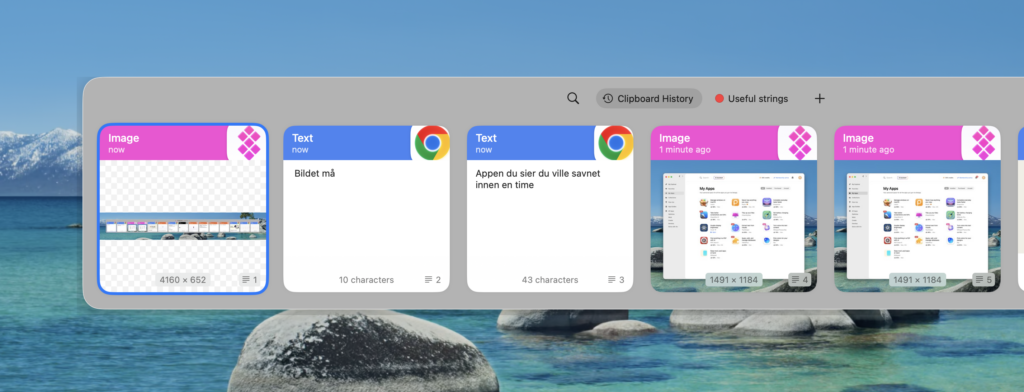
macOS 26 put clipboard history into Spotlight. Press Command-Space, then Command-4, and there’s everything you copied recently — text, links, images — with no third-party app involved.
I’ve been paying for Paste for years. So when the OS shipped the same core feature for free, the obvious question was whether I could stop. I went and looked at what my Paste install had actually accumulated, and the answer was more interesting than a straight yes or no: 2,063 clipboard items from 185 different applications, occupying 12 GB of disk.
Both of those numbers matter, and they point in opposite directions.
What you get for free in macOS 26
Spotlight’s clipboard history is real and it works. Command-Space then Command-4 opens it. Double-click an item to paste it at your cursor, or use the button on the right to load it into the clipboard so a normal Command-V pastes it.
The important limitation is retention. macOS 26.1 gives you three choices: 30 minutes, 8 hours, or 7 days. Seven days is the maximum, and it isn’t the default.
That’s a deliberate design decision, not an oversight. A clipboard history is a log of everything you copy, which routinely includes passwords, API keys, private messages and account numbers. Apple capping it at a week is a privacy-conscious default, and if you’ve never thought about what a clipboard manager is actually storing, that framing is worth sitting with.
For a lot of people this is the whole feature. You copied something twenty minutes ago and lost it — Spotlight gets it back. If that’s your use case, you’re done, and you should not pay for anything.
Where a dedicated clipboard manager still wins
The difference isn’t the feature list. It’s the time horizon and the retrieval.
My Paste library holds 2,063 items, and the oldest ones go back years — well past any seven-day window. Searching that archive is not a “what did I just copy” operation, it’s closer to a personal search index of every snippet, URL, error message and config fragment that has passed through my hands.
The 185 distinct source applications is the number that surprised me. Paste records which app each item came from, and you can filter by it. That turns out to be how I actually find things: I don’t remember the text, I remember that I copied it out of Terminal, or out of Notion, or out of a specific browser. Spotlight’s clipboard doesn’t give you that axis at all.
Pinned items are the other real difference. Paste lets you keep a set of snippets permanently — the boilerplate you paste weekly, the addresses, the commands you can never remember. Those aren’t history, they’re a library, and a seven-day rolling buffer can’t hold them by definition.
So the split is fairly clean:
| Need | Use |
|---|---|
| “What did I copy an hour ago?” | Spotlight, free |
| “What did I copy last March?” | Paste |
| “Find the thing I copied out of Terminal” | Paste |
| Permanently pinned snippets | Paste |
| Minimal data retention | Spotlight, deliberately |
The 12 GB problem
Here’s the part I didn’t expect, and the reason I’d hesitate before telling you to install this.
My Paste data directory is 12 GB. For 2,063 items.
Broken down, it’s 9 GB of backups, a 254 MB live database, and a 371 MB search index. So the clipboard content itself is a rounding error next to a backup folder nine times its size, sitting in Application Support where nobody would think to look for it.
That’s not a catastrophe on a large SSD, and images and rich content legitimately take space. But 9 GB of backups accumulating silently is the kind of thing that should be a visible setting, and it isn’t. If you install a clipboard manager and forget about it — which is precisely what a good clipboard manager encourages — check on it occasionally.
The privacy implication is the same one, worn differently. A seven-day buffer forgets your mistakes. A years-deep archive with a search index does not. Whatever credential you pasted in 2024 is, in all likelihood, still sitting in that 254 MB database. That’s a real argument in favour of Apple’s shorter default, and a real reason to go clear out your history if you’ve been running one of these apps for years without thinking about it.
Paste does let you exclude specific apps from being recorded, and if you use a password manager you should absolutely add it to that list. Do it before you accumulate the archive, not after.
Should you pay for it now?
For most people, no — the built-in one is now enough. The free feature covers the common case, it’s faster to reach, and it retains less, which is a feature rather than a shortcoming.
Pay for a clipboard manager if:
- You want history going back further than seven days
- You want to filter by source application
- You want permanently pinned snippets, not just recent history
- You move a lot of content between apps as an actual part of your work
And skip it if you mostly want to recover something you copied this morning, or if you’d rather your machine kept less of a record of you.
Paste is one of the apps included in Setapp, which is how I have it — the same way I get AlDente for battery charge limiting, another app macOS 26 partly caught up with. That’s becoming a pattern worth naming: the OS is absorbing this category of utility one feature at a time, and the honest case for a subscription gets narrower each release. I went through whether the maths still works in my full assessment of whether Setapp is worth it.
FAQ
Does macOS 26 have clipboard history?
Yes. Spotlight includes it — press Command-Space, then Command-4. It stores text, links and images, with a maximum retention of 7 days as of macOS 26.1.
How long does macOS keep clipboard history?
You choose between 30 minutes, 8 hours, or 7 days. Seven days is the longest available and is not the default.
Is Paste still worth it after macOS 26?
Only if you need history older than a week, filtering by source app, or permanently pinned snippets. For recovering something copied recently, the built-in Spotlight feature is enough.
Is clipboard history a security risk?
It stores whatever you copy, which includes passwords and keys unless you exclude those apps. A longer retention window means a longer-lived record. Exclude your password manager from any clipboard app you use, and clear old history periodically.
How much disk space does Paste use?
More than you’d guess. On my machine, 2,063 stored items came to 12 GB total — 9 GB of which was backups rather than clipboard content.
Indie maker and developer. Building productivity tools and writing about systems, automation, and the craft of focused work.
Want a custom Notion template?
Browse my ready-made tools or get in touch for a custom build.