MacBook Charge Limit: macOS 26 vs AlDente in 2026
On this page
Disclosure: this article contains affiliate links. If you subscribe to Setapp through them, I earn a commission at no extra cost to you. I pay for Setapp myself and nobody reviewed this before publication.
macOS 26 added a real MacBook charge limit to System Settings. You can now cap charging anywhere from 80% to 100% without installing anything. For most people that ends the discussion — the third-party app you were about to buy is now a system setting.
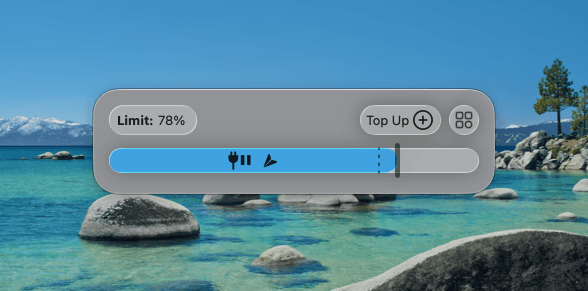
I still run AlDente. Not because the built-in feature is bad, but because of one specific number: 80% is the floor Apple will let you set, and I run mine at 78%.
This is the honest version of that comparison, written on a MacBook running macOS 26.5.2, with the battery data to go with it.
What macOS 26 actually gives you
Two different features get confused constantly, so let’s separate them.
Optimized Battery Charging has been in macOS for years. It is not a limit. It uses on-device learning to *delay* charging past 80% when it predicts you’ll be plugged in for a while, then tops up to 100% before you normally unplug. The moment you discharge a few percent, it resets. Plenty of people set it and assumed they had a charge cap. They didn’t.
Charge Limit arrived in macOS 26.4 and is a hard cap. You set a value between 80% and 100% in System Settings → Battery, and the Mac holds it. This is the feature that genuinely replaces third-party apps for most users.
If you’re on macOS 26.4 or later and you want an 80% cap, stop reading and go turn it on. You do not need to pay anyone. That is the correct recommendation for the large majority of MacBook owners, and any article that buries it is selling you something.
The gap: everything below 80%
Apple locked the floor at 80%. You cannot set 75%, 70%, or 60% in System Settings.
That matters if your MacBook lives on a desk. Mine is docked and on power roughly all day. Lithium-ion cells age faster the more time they spend at a high state of charge, so for a machine that is effectively a desktop, a lower hold — somewhere in the 60–80% band — is gentler than parking at 80% permanently.
Right now my Mac reports a 78% state of charge and is not charging. That is AlDente holding it there. It’s two percentage points below what macOS will let me configure, which sounds trivial and is exactly the point: the built-in feature cannot express the configuration I actually want. Not “doesn’t do it as nicely” — cannot express it.
If you want a limit at or above 80%, the OS covers you completely. If you want anything below it, third-party is still the only route.
My actual battery data, including the part that undercuts me
Here is where most articles on this topic stop being useful, because they never show numbers from a real machine that has been doing this for years.
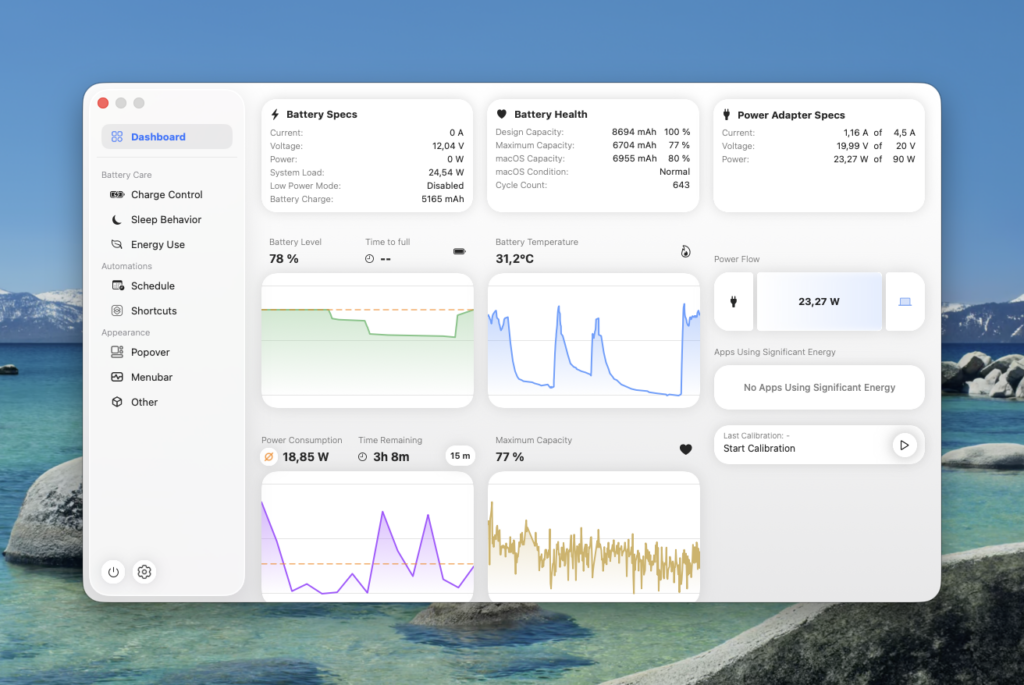
Mine, read from System Information:
| Metric | Value |
|---|---|
| Cycle count | 643 |
| Maximum capacity | 80% |
| Condition | Normal |
| State of charge | 78% (holding, not charging) |
Read that second row again. After 643 cycles with charge limiting in place, my battery is at 80% of its original capacity. Apple considers a notebook battery consumer-grade until it hits 80% at 1000 cycles. I got there early, not late.
I am not going to pretend that’s a glowing endorsement of charge limiting, because it isn’t. It’s a MacBook that has been through heavy daily use, a lot of it thermally aggressive — long compiles, agent workloads, external displays. Heat degrades lithium-ion cells at least as much as high state of charge does, and no charge limiter protects you from heat.
What I can say honestly is narrower than what most affiliate posts claim: charge limiting is one of several variables, it is cheap to do, and it is not a miracle. Anyone showing you a battery at 98% capacity after 600 cycles and crediting one app is showing you a machine that mostly sat idle.
Where AlDente still earns its place
With the OS covering the 80–100% band, the remaining case for the paid app is narrow and specific. For me it’s three things:
Limits below 80%. Covered above. This is the whole ballgame for a docked machine.
Heat protection. AlDente Pro can pause charging when the battery gets hot, which is the failure mode that actually shortens battery life on a hard-working laptop. This addresses the variable my own 643-cycle data suggests mattered more than state of charge did.
Calibration. Holding a battery in a narrow band indefinitely makes the percentage readout drift, because the system loses its reference points. AlDente can run a deliberate full cycle to recalibrate. macOS gives you no equivalent control.
The free version of AlDente does charge limiting between 20% and 100%. Heat protection and calibration are Pro features. If all you want is a limit below 80%, the free tier already does it — a fact the app’s own marketing does not exactly shout.
So is it worth paying for?
Genuinely, for most people: no, not any more. macOS 26.4 took the main reason to install a battery app and made it a system setting. That is a good outcome and I’d rather say so than pretend otherwise.
It’s worth it if you fall into one of these:
- Your Mac is docked most of the day and you want to hold it below 80%
- You run thermally heavy workloads and want charging to back off when the battery is hot
- You’re on macOS 26.3 or earlier and can’t or won’t update
Note the shape of that list: it’s a *desk* problem, not a laptop problem. If you actually carry your MacBook around and run it down regularly, the built-in limit is fine and you should use it.
AlDente is one of the apps included in Setapp, which is how I have it. That’s worth mentioning only because the standalone Pro licence and a Setapp subscription cost roughly the same order of money, and Setapp includes about 250 other apps — so if AlDente is the *only* thing you’d use from it, buy AlDente directly instead. I wrote a longer honest assessment of whether Setapp is worth it that goes through the actual maths.
FAQ
Does macOS 26 have a battery charge limit?
Yes. macOS 26.4 added a hard Charge Limit in System Settings → Battery, settable from 80% to 100%. This is separate from Optimized Battery Charging, which only delays charging rather than capping it.
Can I limit my MacBook to 70% or 60%?
Not with built-in settings — Apple’s floor is 80%. Limits below that require a third-party app such as AlDente.
Does limiting charge to 80% actually help?
It reduces one source of battery ageing, but it is not the only one. Heat matters at least as much. My own battery reached 80% maximum capacity at 643 cycles despite charge limiting, on a machine that runs hot.
Is AlDente safe?
It sets the charge limit through a privileged helper that talks to the system management controller — the same mechanism macOS now uses itself. On my machine it runs as com.apphousekitchen.aldente-pro-setapp.helper. It needs that privilege to work at all, which is worth understanding before you install it.
Do I still need AlDente after updating to macOS 26?
Only if you want a limit below 80%, want heat-based charging pauses, or want manual calibration. For a plain 80% cap, the built-in setting is enough.
Stay in the loop
Productivity tips, tool reviews and early access to new products, straight to your inbox.