Wispr Flow Review: 2 Years of Dictating Into Claude Code
On this page
Disclosure: this article contains affiliate links to Wispr Flow. If you subscribe through them, I earn a commission at no extra cost to you. I have paid for Wispr Flow myself for about two years, and nobody at Wispr reviewed this article before publication.
Short version of this Wispr Flow review: after about two years of daily use, it is the one dictation tool I would pay for. I use Wispr all the time, for everything — almost every prompt I send to Claude Code goes through it. When it gets a technical term wrong, I add the word to the custom vocabulary and it sticks. On the Team plan, those words (and meetings) are shared across the team. That is the product I am reviewing.
If you want to try the same workflow, start with Wispr Flow's free plan and see whether talking to your agent feels natural before you pay.
What Wispr Flow is, and what it costs
Wispr Flow is a dictation app for Mac, Windows, iPhone and Android. You hold a shortcut, talk, and it types cleaned-up text into whatever field has focus: a terminal, a browser, Slack, an editor. It also has a Notetaker for meetings. This review is about dictation.
Pricing as of 10 October 2026, from Wispr's pricing page:
| Plan | Price | What you get (from Wispr's page) |
|---|---|---|
| Free | $0 | 2,000 words a week on desktop, 1,000 on mobile; dictation in any app |
| Pro | $15/user/month, or $12/user/month billed annually | Unlimited dictation; for individuals and teams; shared dictionary and snippets; shared team workspace |
| Growth | $23/user/month, or $18/user/month billed annually | Everything in Pro, plus basic admin controls, unlimited Notetaker, SSO, and org-wide HIPAA with a BAA |
| Enterprise | Contact sales | Everything in Growth, plus SCIM, MDM, admin seats, and related org features |
I am on the Wispr Flow Team plan, and it works great. The team can share words in the dictionary and share meetings across the team. Check current plans on the Wispr Flow site before you buy, because the plans change.
The free plan is a real trial, not a demo. 2,000 words a week is enough to find out whether you like talking to your computer. It is not enough if you prompt an agent all day.
Try Wispr Flow free — enough words per week to test dictation into Claude Code before you pick a paid plan.
Dictating into Claude Code
I use Wispr for Claude Code prompts every day. Talking is how most of those prompts get into the terminal: I hold the shortcut, describe the work, and Wispr types into the focused field. That is the workflow this review is about — not writing code syntax by voice.
Claude Code also has built-in /voice dictation for the CLI and VS Code extension. If you are choosing between that and a system-wide app, see Claude Code /voice vs Wispr Flow — a docs-based comparison, not an accuracy bake-off.
Task descriptions still matter for agents. I wrote about that in my post on running Claude Code as an async developer from Notion. Dictation is how I actually produce those prompts at volume.
Technical terms: add the word once
This is the real differentiator, and the reason I keep paying.
Dictation in general is very nice with Wispr. I add words to the custom vocabulary for terms from my files and repositories, and it remembers them. That works very well. When it gets something wrong, I just add the word, and it gets it right after that. On the Team plan, those shared words land in the dictionary the whole team can use.
Speech recognition still struggles with the usual developer junk — framework names, CLI flags, paths, ticket IDs — until those terms are in the vocabulary. I dictate prose about code (prompts, PR descriptions, commit context) and let the agent write the syntax. Anything with brackets or exact flags I still check before sending.
That is the difference between a tool that is impressive in a demo and one that improves the longer you use it.
Wispr Flow vs macOS dictation (and ChatGPT)
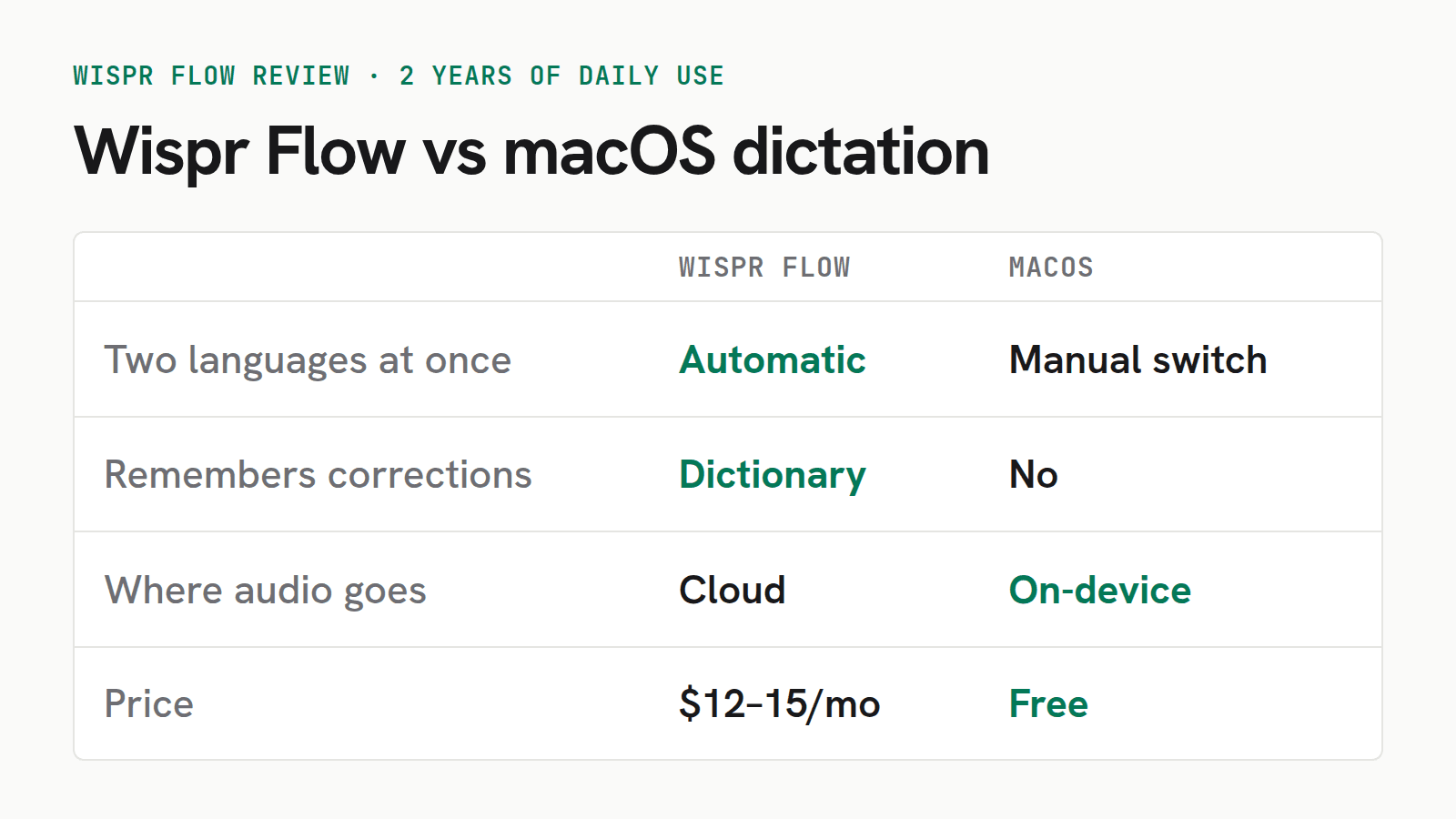
macOS has free dictation built in. Apple's guide describes on-device processing where supported, and switching among configured languages with the language control next to the cursor or the Globe key. Wispr's privacy page says transcription always happens in the cloud. Paid Wispr plans aimed at teams add a shared dictionary and shared workspace, which macOS standard dictation does not.
I am not going to claim a cell-by-cell accuracy shootout I have not re-run on this Mac. What I can say from daily use: I stay on Wispr because of the vocabulary I can share with the team, and because it is how I talk to Claude Code all day.
Compared with ChatGPT's (OpenAI) dictation, Wispr does not show a live transcript while I speak. I am used to that live view from ChatGPT, and I miss it in Wispr. That is my main annoyance with the product.
Just use macOS dictation if you dictate occasionally, mostly plain prose, and you care more about audio staying on your Mac than about a shared team vocabulary. It costs nothing, and for that use it is good enough.
Wispr is for live dictation into whatever field has focus. If the job is turning a published podcast episode into searchable text, that is a different workflow — I use Podskrift for that, not Wispr.
If shared vocabulary and all-day agent prompting matter more than on-device audio, try Wispr Flow against macOS dictation for a week and keep whichever you reach for without thinking.
What I don't like about Wispr Flow
A review with no complaints is an ad. Here are mine.
No live transcript while I speak. This is the main one. ChatGPT's (OpenAI) dictation shows the words as they come in. Wispr waits and pastes when I am done. I am used to the live view, and I miss it.
Your voice goes to the cloud. Always. Wispr is explicit that "transcription always happens in the cloud". Audio is sent over TLS and, according to their privacy page, dictation cloud storage of transcripts and audio is a setting you control. You can also manage model-training options. Those are reasonable controls, and they publish SOC 2 Type II and ISO 27001 reports. But it still means spoken content leaves the machine. Anyone dictating client data in Europe should check the data settings before the first word, not after.
It is another subscription. I use Wispr all day, so the cost is easier to justify than for a tool I open once a week, but it still stacks up. I already pay for Setapp, and I did the arithmetic on whether that is worth it for the same reason. It is real money for something macOS does for free in a simpler form.
Wispr Flow review verdict: who should buy it
Buy Wispr Flow if:
- you write prompts for AI coding agents every day
- you want a custom vocabulary you can grow (and share on a team plan)
- you are fine with audio being transcribed in the cloud
Skip it if:
- you dictate a few messages a week
- audio must stay on your machine
- you want to write code syntax by voice rather than prose about code
- you need a live transcript while you speak (ChatGPT's dictation still wins there for me)
I have paid for it for about two years, I am on the Team plan, and I would buy it again. The free plan is enough to find out whether talking to your agent suits you. If it does, try Wispr Flow for free and give the custom vocabulary a week before you judge it.
FAQ: Wispr Flow
Does Wispr Flow work with Claude Code and Cursor?
It types into any app with a text field, including a terminal running Claude Code. Wispr also markets file tagging in Cursor and Windsurf. I use it all the time for prompts in Claude Code.
How much does Wispr Flow cost?
As of 10 October 2026, Free is $0 with 2,000 words a week on desktop and 1,000 on mobile. Pro is $15 per user per month, or $12 per user per month billed annually, for individuals and teams (shared dictionary and team workspace). Growth and Enterprise add admin and compliance features. Check the pricing page before buying.
Is Wispr Flow private?
Wispr's privacy page says transcription always happens in the cloud. Dictation cloud storage of transcripts and audio is optional, and you can control model-training settings. If you dictate client data, read their data controls first.
Can Wispr Flow dictate code?
I dictate prose about code — prompts, PR descriptions, commit context — not syntax by voice. When it gets a term from my files or repositories wrong, I add the word to the custom vocabulary and it remembers it.
Wispr Flow vs macOS dictation — what is the documented difference?
macOS dictation is free and, on supported Macs and languages, can process audio on-device (Apple). Wispr always transcribes in the cloud and, on paid team-capable plans, offers a shared dictionary. Which is better for you depends on whether you need on-device audio or shared jargon across a team.
Stay in the loop
Productivity tips, tool reviews and early access to new products, straight to your inbox.