Wispr Flow pricing (2026): What's free, what Pro adds, and who should pay
On this page
Prices checked 11 November 2026 on Wispr Flow’s pricing page and Flow plans and what’s included (where noted). Plans change — verify before you buy.
Short version: Wispr Flow’s free plan is $0 on Mac, Windows, iPhone and Android: dictation plus the Notetaker, with generous weekly usage and no credit card. Pro is $15/user/mo monthly, or $12/user/mo when billed annually (20% annual discount on the pricing page), for individuals and teams — it removes the free limits and keeps more meetings longer. Stay on Free if a weekly cap is fine; pay for Pro if you dictate (or take notes) past those limits or need team billing. Enterprise is sales-led for org security controls.
Disclosure: this article contains affiliate links to Wispr Flow. If you subscribe through them, I earn a commission at no extra cost to you. Facts below are from Wispr’s public pricing and related pages, checked 11 November 2026. Nobody at Wispr reviewed this article before publication.
Start with Wispr Flow’s free plan — no card required on Wispr’s pricing page as of this check.
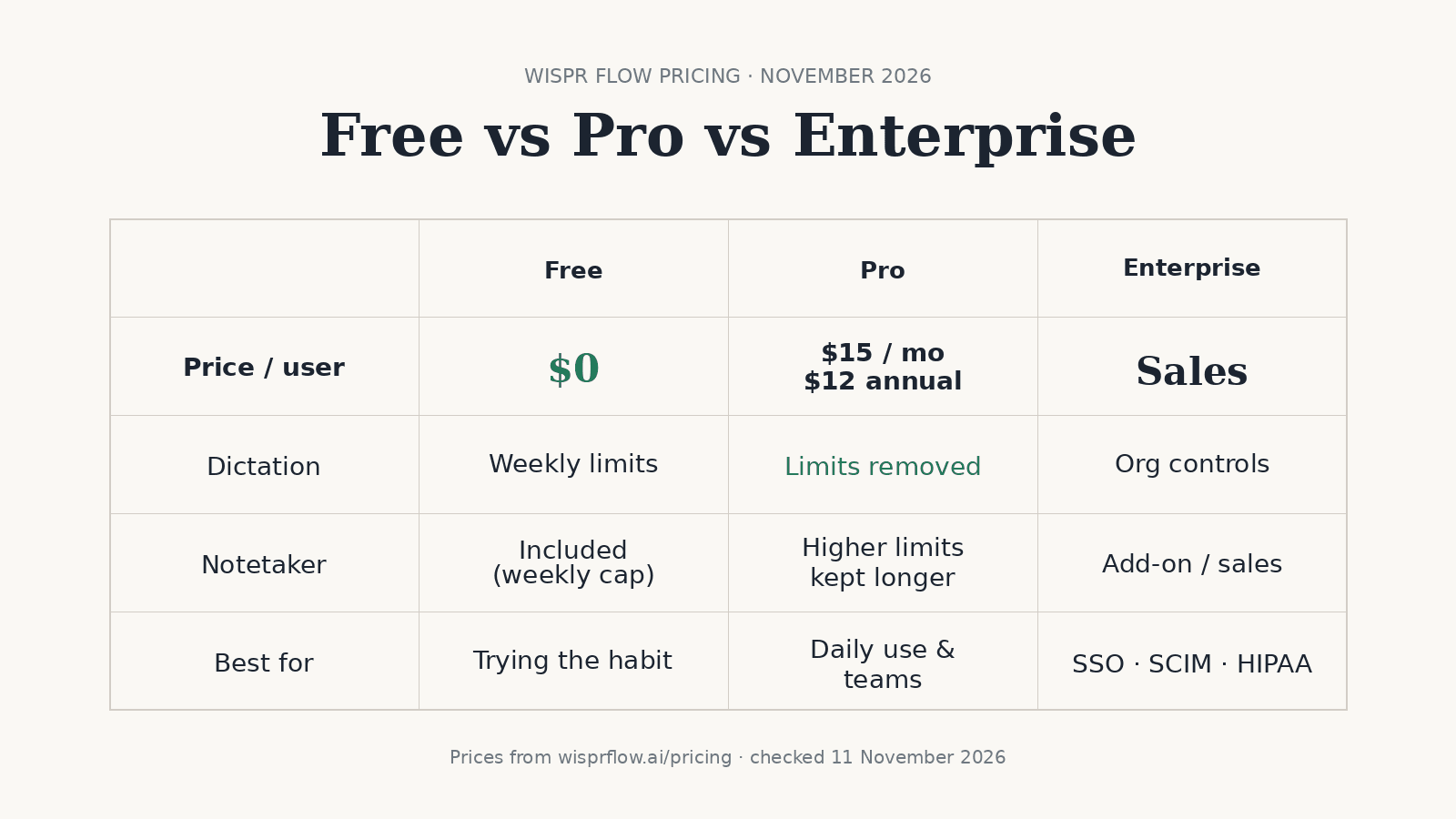
Wispr Flow plans (Free / Pro / Enterprise)
Sources for this table: wisprflow.ai/pricing as of 11 November 2026. Where a detail only appears in Wispr’s plans help article (same date), the cell notes that.
| Free | Pro | Enterprise | |
|---|---|---|---|
| Price (US list, pricing page) | $0/mo | $15/user/mo monthly; $12/user/mo annual (20% discount labeled) | Contact Sales (custom) |
| Platforms — dictation | Mac, Windows, iOS, Android | Same | Same product family; org packaging via Sales |
| Notetaker | Included; weekly meeting limit; Mac & Windows | Higher meeting limits; notes kept longer; included at no extra Pro cost (rollout noted in FAQ) | Sales / org packaging; advanced compliance on higher tiers |
| Usage limits (as stated) | Pricing page: “generous weekly usage,” no credit card. Help docs (11 Nov 2026): Mac/Windows 2,000-word weekly allowance, 5,000-word max, reset Sunday 12 a.m. PT; mobile Free limits pooled and can differ (plans article) | Pro “removes the limits” | Negotiated |
| Team | Individual free use | Individuals and teams; no minimum seat count; shared dictionary/snippets; centralized billing; basic usage dashboards (admin) | Bulk pricing, advanced IT/compliance via Sales |
| Support / security notes on page | Standard free path; “Models never trained on your data” appears in the plan comparison | Priority support (comparison table); data-sharing / retention controls on the page | SSO/SAML, SCIM, audit logs / MDM, enforced HIPAA with BAA, premium support / CSM (comparison + FAQ) |
The same pricing page also shows higher self-serve Growth list prices ($23/user/mo or $18 annual; $33/user/mo or $26 annual depending on Notetaker packaging). Wispr’s help article Flow plans and what’s included (checked the same day) maps those to Growth dictation-only vs Growth with Notetaker. If you only need Pro-level dictation and team seats, start there before Growth/Enterprise.
Student / educator / non-profit: pricing FAQ — students 50% off Pro, educators 40% off, non-profits a discounted rate; Free stays free. The plans help article (11 November 2026) adds that student plans need a recognized student (.edu) email. Cancel any time under Plan & Billing (pricing FAQ). A numeric refund window is not stated on Wispr’s pricing page as of 11 November 2026.
Try Wispr Flow free if you want to feel the product before Pro.
Is Wispr Flow Pro worth it?
Based on Wispr’s own Free vs Pro differences as of November 2026:
- Stay on Free if weekly dictation and meeting caps are enough, you do not need team billing, and you are still testing whether system-wide voice-to-text sticks.
- Pay for Pro if Free’s weekly limits interrupt work, you want more meetings retained longer, or you need Pro’s team path (invite seats with no minimum, shared dictionary/snippets, centralized billing, priority support as listed on the pricing comparison).
- Talk to Sales (Enterprise) when you need org-enforced SSO/SAML, SCIM, audit/MDM, or enforced HIPAA — items Wispr lists for the sales-led tier, not for Free/Pro.
I already published first-person product context in Wispr Flow Review (Team plan, dictating into Claude Code, vocabulary). This page is about the pricing decision, not a new usage study. If you would hit the free weekly allowance most weeks, Pro’s removes-the-limits claim addresses that; if not, Free is the honest answer.
Cheaper / other options
For a Mac-wide shortlist (Wispr, Superwhisper, Apple Dictation, Claude Code /voice and local apps), see Best dictation apps for Mac.
- Superwhisper — local/offline options and a one-time Pro license shape; full comparison in Wispr Flow vs Superwhisper. As of 11 November 2026, Superwhisper’s plans docs list Pro at $8.49/month, $84.99/year, or $249.99 lifetime (store prices can be higher). Official site only — no
/go/affiliate for Superwhisper here. - Built-in macOS dictation — free on Mac; a generic alternative when you do not want another subscription.
- Claude Code
/voice— enough when you only dictate inside Claude Code on a claude.ai account; see Claude Code /voice vs Wispr Flow. - Meetings / Notetaker vs Granola — different job from everyday dictation pricing; one sentence: Wispr Flow vs Granola.
Verdict
Wispr Flow’s free plan is a real starting point: $0, dictation + Notetaker, weekly limits, no card. Pro at $15/user/mo ($12 annual) is the pay-when-limits-hurt plan for individuals and small teams. Enterprise is for compliance packaging, not for solo price shopping. Check wisprflow.ai/pricing again before you buy — this page’s numbers are dated 11 November 2026.
Start with Wispr Flow’s free plan and upgrade from Plan & Billing only if the weekly caps get in the way.
FAQ: Wispr Flow pricing
Is Wispr Flow free?
Yes. As of November 2026, Wispr’s pricing page says Flow is free and includes dictation and the Notetaker with generous weekly usage, with no credit card required. Pro removes the limits and keeps more meetings for longer. Wispr’s help article Flow plans and what’s included (checked 11 November 2026) states Mac and Windows Free dictation has a 2,000-word weekly allowance and a 5,000-word maximum (reset Sunday 12 a.m. PT); iOS/Android Free limits are pooled and can differ by account.
Wispr Flow Pro — monthly or annual, and is Pro worth it?
On wisprflow.ai/pricing as of 11 November 2026, Pro is $15/user/mo on monthly billing, or $12/user/mo with annual billing (Wispr labels a 20% annual discount). Pro is worth it when free weekly limits block daily dictation or you need team features Pro lists (shared dictionary/snippets, centralized billing, priority support). For light weekly use, Free is enough.
Does Wispr Flow have a student discount?
Yes for Pro. Wispr’s pricing FAQ (November 2026) says students get 50% off Pro, educators 40% off, and non-profits a discounted rate. Free remains free for everyone, students included. Wispr’s plans help article (checked 11 November 2026) says student plans require a recognized student (.edu) email address; ineligible addresses can still use Free normally. Details and signup flow are also on Flow for Students.
Can I cancel Wispr Flow any time?
Yes. Wispr’s pricing FAQ says there are no commitments and you can cancel anytime under Plan & Billing in the Flow desktop app (or from the pricing page when upgrading). A separate refund policy length is not stated on the pricing page as of 11 November 2026.
Does the free plan include the Notetaker?
Yes. Wispr’s pricing FAQ says the free plan includes the Notetaker with speaker identification, questions about meetings, and MCP access, with a weekly meeting limit. Pro includes more meetings kept for longer. Notetaker runs on Mac and Windows (mobile on the roadmap).
Is there a Wispr Flow team plan / minimum seats?
Pro is for individuals and teams. Wispr’s pricing FAQ says you can create a team with no minimum seat requirement, invite teammates without upfront payment, and use shared dictionary/snippets plus centralized billing. Enterprise (SSO/SAML, SCIM, audit logs, enforced HIPAA, and related controls) is via Sales.
Stay in the loop
Productivity tips, tool reviews and early access to new products, straight to your inbox.