141 Stray Worktrees: The Home Repo Pattern for Claude Code
On this page
I started Claude Code in ~/repositories so every agent could reach every repo. A few months later that folder held 164 clones, 141 git worktrees sitting next to them as sibling folders (<repo>-row4, <repo>-tsk123), 71 loose files (screenshots, patches, exports, plus two files a curl command had accidentally named --header and --url), and 50 folders that were not repos. 54 GB in total. Every ls, glob and grep the agent ran went through that noise.
This post is how I applied Matt Pocock’s home repo pattern for Claude Code, the one change I had to make so it fits this harness, and the cleanup that freed about 26 GB without losing work.
Pocock’s home repo pattern
Matt’s idea is simple. Put shared skills, AGENTS.md and docs in one git repo — the home repo — and run agents from there. That file holds one pointer line per other repo: name, what it is, local path, and where to clone from if the folder is missing. Past about 20 repos, group those pointers by area instead of dumping every line into one file.
That map is the durable context layer next to the Claude Code memory system I already run: routing indexes and topic files for facts, pointer files for where the code lives.
My setup
I already had a knowledge repo playing the home-repo role — skills, AGENTS.md, a JSON registry of about 130 repos. What was missing was the navigation contract agents would actually follow:
- Pointer files, one per area (agency clients, LMS product, personal), generated from the JSON registry by a small script. Lint fails if they drift.
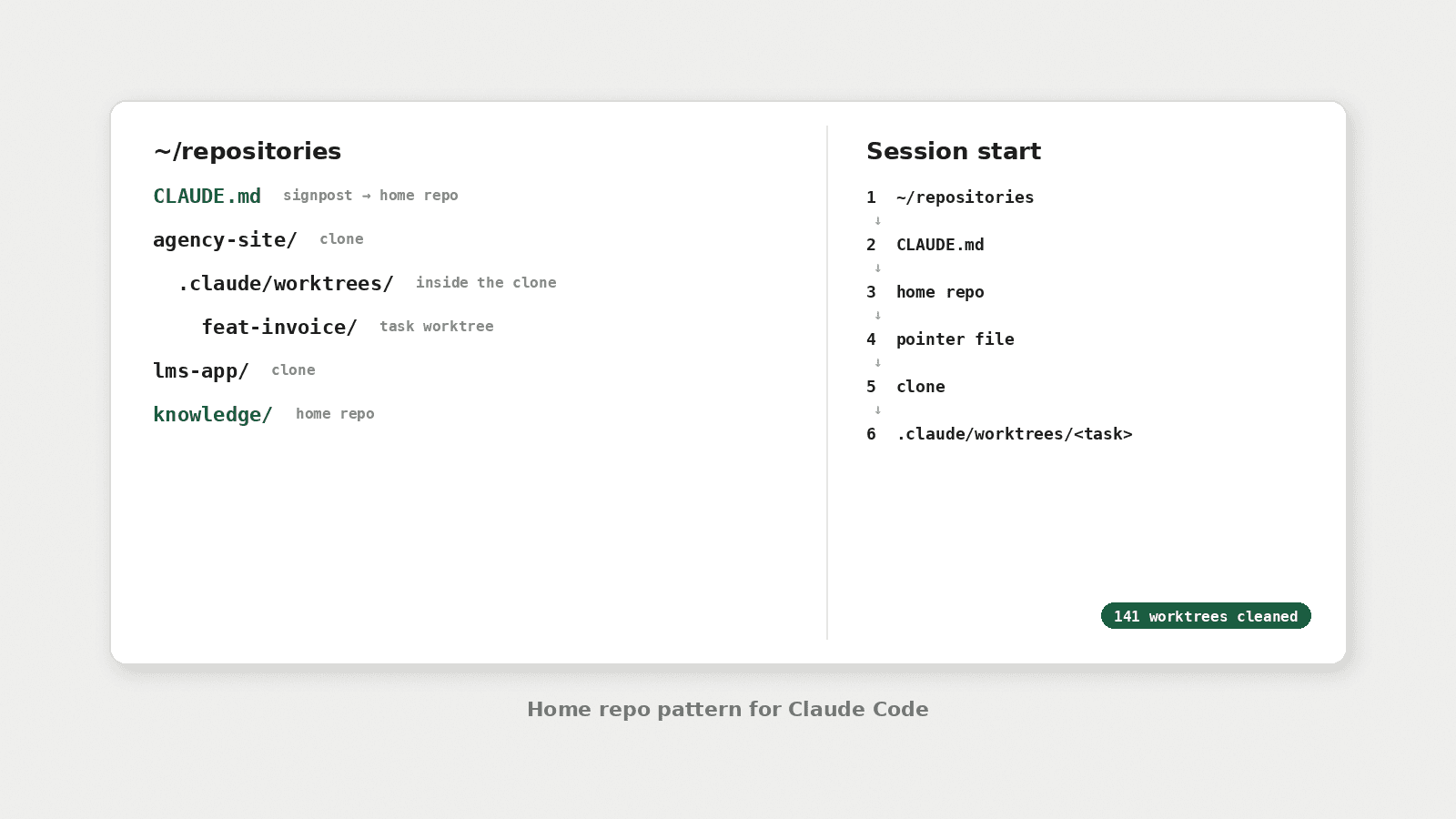
- One worktree rule: live inside the clone at
<repo>/.claude/worktrees/<task>. That is also Claude Code’s own default. - Loose files go to the session scratchpad,
_inbox/, or_archive/— never the root of~/repositories.
flowchart LR
  A["~/repositories"] --> B["CLAUDE.md"]
  B --> C["home repo"]
  C --> D["pointer file"]
  D --> E["clone"]
  E --> F[".claude/worktrees/task"]
The start folder stays the workspace. The home repo stays the map and the shared rules. The clone is where the worktree lives.
The twist: start in the workspace, not the home repo
Pocock’s version has agents start in the home repo. I tried that. It does not fit Claude Code the way I use it.
Claude Code’s EnterWorktree only switches into worktrees of repos nested inside the folder the session started in, and cd outside that folder does not persist between commands. Started from the home repo, every other clone sat outside reach. (That EnterWorktree behaviour comes from the tool’s own documentation. I have not run the full start-to-worktree flow end to end from a fresh session.)
Fix: keep starting in ~/repositories, and put a short CLAUDE.md there that points to the home repo and the pointer files. Pocock’s own variant clones repos into the home repo, which also solves the nesting problem. My variant leaves the clones where they already were and uses the root CLAUDE.md as a signpost.
That is the most useful part of this post if you already have a big ~/repositories tree and do not want to relocate every clone.
Where the mess came from
The agents were not being sloppy. One of my own troubleshooting notes told them to put worktrees at ~/repositories/<repo>-<task> to fix a different problem. They followed it faithfully, hundreds of times.
Lesson: an agent instruction written to fix one bug becomes policy. Same failure mode as in Claude Code memory: 7 failures and the rules that fixed them — a rule left lying around keeps working long after the situation that justified it is gone.
Cleaning up without losing work
One-time pass. I approved a list per group first:
- 33 worktrees deleted — their work was already merged or pushed.
- 178 archived, then deleted — uncommitted changes saved as a patch, unpushed commits as a
git bundle, ignored files (like.env) as a tarball, before removing the worktree. - 19 with open PRs moved into their clone with
git worktree move. - 22 old clones moved to an archive folder; 17 active ones added to the registry.
About 26 GB freed.
Gotcha: “is this merged?” has to check the PR. Squash merges mean the branch HEAD is never an ancestor of main, so a naive git merge-base check will keep worktrees you could have deleted — or, worse, make you think something is still unique when it is not.
Keeping it clean
Two small automations, in the same spirit as the Claude Code automation hooks and scheduled jobs I already run:
- A Claude Code
SessionStarthook compares the root folder against the registry and warns about anything new. It caught a stray sibling worktree an hour after the rule went live — made by a session that started before the newCLAUDE.mdexisted. - A daily cleanup job (launchd) removes worktrees that are provably safe and, on Mondays, sends a Slack DM with anything left over. It also stamps a “last done” date on a Notion routines list, so a dead job shows as overdue.
Bonus lesson while setting this up: ~/Library/LaunchAgents had been emptied a few days earlier, so every scheduled job on the Mac had silently stopped. The job definitions now live in git with an install script.
Checklist to copy
[ ] Pick one start folder that holds all clones (e.g. ~/repositories)
[ ] Put a short CLAUDE.md there that points to your home repo and pointer files
[ ] Keep shared skills, AGENTS.md and docs in the home repo
[ ] One pointer line per repo from a single registry; lint fails on drift
[ ] Past ~20 repos, group pointers by area
[ ] Worktrees only at <repo>/.claude/worktrees/<task> — never siblings in the root
[ ] Loose files → scratchpad, _inbox/ or _archive/ — never the root
[ ] SessionStart (or similar) warns when the root drifts from the registry
[ ] Daily/weekly job removes safe worktrees and reports leftovers
[ ] Scrub old troubleshooting notes that contradict the new worktree rule
What to take away
- One start folder that holds all repos, plus a
CLAUDE.mdthere pointing at your shared rules. - One pointer line per repo, generated from a single registry, checked by lint.
- Worktrees inside the clone, never next to it.
- A hook or job that notices drift, because agents will follow any instruction you leave lying around.
If you are still building the knowledge side of this stack, start from the memory system and the audit lessons. The home repo pattern is the map of where the code is; those posts are the map of what you have already learned.
FAQ: Claude Code home repo pattern
What is the home repo pattern for Claude Code?
One git repo holds shared skills, agent rules, and docs, plus one pointer line per other repo (name, what it is, local path, clone URL if missing). Agents use that map to open or clone repos as needed. Matt Pocock described the pattern; my Claude Code twist is starting in the workspace folder that holds the clones, with a short CLAUDE.md pointing at the home repo.
Where should Claude Code worktrees live?
Inside the clone, at <repo>/.claude/worktrees/<task>. That matches Claude Code’s own default. Sibling folders next to the clone (~/repositories/<repo>-<task>) turn the start folder into a junk drawer — I had 141 of them before the cleanup.
Why not start Claude Code inside the home repo?
In my setup, Claude Code’s EnterWorktree only switches into worktrees of repos nested inside the folder the session started in, and cd outside that folder does not persist between commands. Started from the home repo, every other clone was out of reach. I keep starting in ~/repositories and point to the home repo from a short CLAUDE.md there. (I have not run the full start-to-worktree flow end to end from a fresh session; the EnterWorktree rule comes from the tool’s own documentation.)
How do I keep the start folder from filling up again?
Generate pointer files from a single registry and fail lint when they drift. Add a SessionStart hook that compares the root against the registry. Run a daily job that removes worktrees that are provably safe and reports anything left over. Agents follow any instruction you leave lying around — including old troubleshooting notes — so drift detection matters as much as the rules.
How do I clean up existing sibling worktrees safely?
Approve a list per group first. Delete only when work is already merged or pushed. Otherwise archive before remove: uncommitted changes as a patch, unpushed commits as a git bundle, ignored files (like .env) as a tarball. Move open-PR worktrees into their clone with git worktree move. Check “is this merged?” via the PR — squash merges mean the branch HEAD is never an ancestor of main.
Stay in the loop
Productivity tips, tool reviews and early access to new products, straight to your inbox.