One MCP Server That Gives Notion AI and Cloud Agents Your Memory
On this page
Disclosure: this article contains affiliate links to Wispr Flow. If you subscribe through them, I earn a commission at no extra cost to you. Nobody at Wispr reviewed this article before publication.
Short answer
A Notion AI MCP server for personal memory is a small, hosted, read-only MCP process over the same markdown knowledge base local Claude Code already reads from disk. The tools are search, then read a file or a section. Put it behind OAuth so Notion AI Custom Agents, claude.ai custom connectors, and Claude Code cloud sessions can authenticate without embedding a long-lived secret in every client. That is the one door those surfaces share when they cannot open the private repo themselves.
👉 Use this template on GitHub — click Use this template, make the copy private, run /setup. Star the repo if it helps you keep the pattern around. Product page: /products/personal-memory-template/.
When I write longer prompts for Claude, I dictate them with Wispr Flow — same habit as in my Wispr Flow review. Try Wispr Flow’s free plan if you want to test that workflow.
The problem: local agents read the repo, cloud tools can’t
The knowledge base is a private git repo of markdown: index, clients, engineering notes, playbooks. Local Claude Code opens that folder and follows the same rules as in Claude Code memory lessons, CLAUDE.md too long, and the auto-memory load window.
Notion AI, claude.ai, and Claude Code cloud sessions sit somewhere else. In my setup the cloud sessions couldn’t clone my private memory repo, so they had no disk path into those files. Pasting excerpts by hand does not scale. Uploading the whole wiki into a project is a second copy that drifts. I needed one protocol surface those clients already speak: remote MCP.
This article is about exposing a personal markdown memory. For building MCP servers in general, see build an MCP server and custom MCP server lessons.
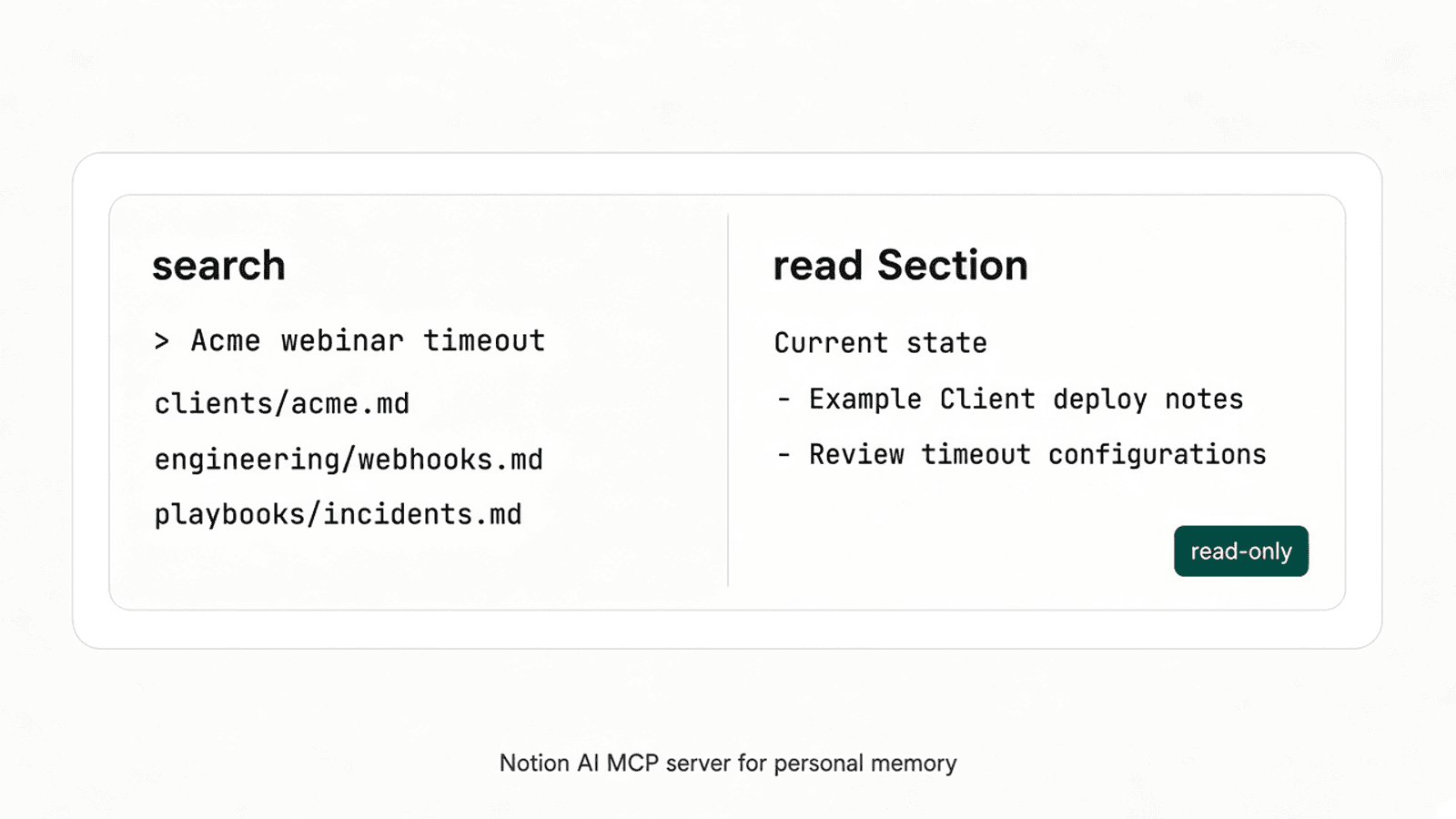
The design: read-only search, then read a section
Two tool kinds. Search returns ranked file paths (and short snippets) for a question. A follow-up tool reads one file, or one named section inside a file, so the model does not pull an entire long note when it only needs the current-state heading for Example Client.
Why read-only: the markdown repo remains the source of truth. Writes belong in the usual git workflow (and skills like ingest in the LLM wiki template), not through a connector that Notion AI or claude.ai might call mid-chat. The MCP schema documents a readOnlyHint annotation for tools that do not modify their environment (ToolAnnotations in the 2025-11-25 schema); clients must still treat annotations from untrusted servers as untrusted.
Illustrative TypeScript sketch (not production code; placeholder host; official MCP SDK shape):
// Illustrative only — placeholder names, not a real server.
import { McpServer } from "@modelcontextprotocol/sdk/server/mcp.js";
import { z } from "zod";

const server = new McpServer({ name: "personal-memory", version: "0.1.0" });

server.registerTool(
  "search_memory",
  {
    description: "Search the markdown knowledge base; return top paths.",
    inputSchema: { query: z.string() },
    annotations: { readOnlyHint: true },
  },
  async ({ query }) => {
    // Look up query in a local index of the synced repo copy…
    return { content: [{ type: "text", text: JSON.stringify([]) }] };
  },
);

server.registerTool(
  "read_section",
  {
    description: "Read one file, or one ## heading section, from the wiki.",
    inputSchema: {
      path: z.string(),
      heading: z.string().optional(),
    },
    annotations: { readOnlyHint: true },
  },
  async ({ path, heading }) => {
    // Read clients/acme.md or a single section…
    return { content: [{ type: "text", text: "" }] };
  },
);

// Serve over HTTPS at https://memory.example.com/mcp (placeholder).
Keep the tool count small — the same lesson as in custom MCP server lessons: a few sharp tools beat a sprawling CRUD surface.
OAuth so Notion AI, claude.ai, and cloud sessions can connect
Remote clients need a way to prove who is calling. The MCP authorization specification (checked 16 November 2026) defines HTTP transport authorization based on OAuth 2.1: the MCP server is a resource server, clients obtain access tokens from an authorization server, and Protected Resource Metadata advertises where to authenticate.
That matches how the hosted clients describe sign-in. Anthropic’s custom connectors with remote MCP guide (checked 16 November 2026) walks through adding a remote URL and choosing OAuth (“Sign in now” / “Sign in when needed”). Notion’s MCP connections for Custom Agents page (checked 16 November 2026) lists OAuth and header-based auth for custom servers.
High level only here: put the memory server behind OAuth, do not ship a shared bearer token to every chat product, and follow the build notes in build an MCP server when you implement the flow.
Making it fast enough
Search latency matters because the agent often searches before it reads. In my setup, with a warm cache, search is about 60 ms (before the cache work it was 140–360 ms). Reading one section is about 25 ms.
Search quality is the other half. On the 20-question recall test in the October 2026 audit, finding the right file in the top 3 went from 50% to 85% (Recall@3). Those numbers are for my knowledge base and indexing approach, not a promise about every repo.
The stale-copy lesson: automate and measure sync
The server does not edit the live working tree on my laptop. It serves a copy of the repo. That copy once sat four weeks stale without anyone noticing.
The fix pattern is boring on purpose: sync must be automated and measured. Expose the last-synced commit and time (or an equivalent freshness signal) and check it on a schedule so silence cannot mean “still current.” Do not treat a successful OAuth handshake as proof the markdown is fresh.
Connecting it: Notion AI, claude.ai, Claude Code cloud
Only what the public docs confirm (checked 16 November 2026):
Notion AI / Custom Agents. Notion’s help article MCP connections for Custom Agents says MCP connections are available on Business and Enterprise plans. Custom remote MCP servers use a public URL; a workspace admin must enable custom MCP servers under Settings → Connections. Agents add the server under Tools & Access → Custom MCP server, with OAuth or header-based auth. A related guide describes the same admin gate under Settings → Notion AI → AI connectors (Connect Custom Agents to MCP integrations).
claude.ai. Get started with custom connectors using remote MCP says custom connectors using remote MCP are available on Free, Pro, Max, Ultra, Team, and Enterprise (Free is limited to one custom connector). Claude reaches the server from Anthropic’s cloud over HTTPS on port 443 — the host must be publicly reachable. Add the connector under Customize → Connectors (Owners add it first on Team/Enterprise).
Claude Code cloud. Connect to MCP servers says cloud sessions outside a project’s threads can load MCP from a committed .mcp.json in a single-repository session, and cloud threads in a project use your claude.ai connectors. Configure cloud environments adds that MCP connector traffic goes through Anthropic’s servers (not the session network allowlist), and that cloud sessions start from a fresh clone of the session repository — local-only MCP config does not travel with you. That is why a remote memory connector mattered in my setup when the private wiki was not the repo the cloud session cloned.
For a broader Notion task system next to the wiki, see GTD Notion setup for 2026.
Where this fits in the series
- Hub: 7 failures and the rules that fixed them.
- Always-on rules: CLAUDE.md too long.
- Auto-memory load window: Claude Code auto memory not working?.
- Template product page: free LLM wiki template for Claude Code.
- Skills hygiene: Claude Code skill versioning.
- This post: one read-only MCP server for personal knowledge base access from Notion AI, claude.ai, and Claude Code cloud.
👉 Use this template on GitHub — Use this template, make it private, run /setup.
If you dictate longer prompts into Notion AI or Claude, Wispr Flow’s free plan is the system-wide dictation path I compared with Claude Code /voice in Claude Code /voice vs Wispr Flow.
Subscribe below if you want template updates and later series posts by email.
FAQ: Notion AI MCP server and cloud memory
What is a Notion AI MCP server for a personal knowledge base?
A remote MCP server that exposes search and read tools over your markdown wiki. Notion’s help docs describe custom MCP connections for Custom Agents on Business and Enterprise plans (MCP connections for Custom Agents).
Why use a remote MCP server for personal knowledge base access?
Local Claude Code can open the git repo on disk. In my setup, Notion AI, claude.ai, and Claude Code cloud sessions could not clone that private repo, so a hosted read-only MCP server was the shared way in.
Do claude.ai custom connectors support remote MCP and OAuth?
Yes. Anthropic’s custom connectors with remote MCP guide covers adding a remote server URL and OAuth sign-in. The MCP authorization specification is based on OAuth 2.1.
How do Claude Code cloud sessions get MCP memory tools?
Claude Code docs say a single-repo cloud session can load project MCP servers from a committed .mcp.json, and cloud threads in a project can use claude.ai connectors (Connect to MCP servers, Configure cloud environments).
Why keep an MCP server for personal knowledge base read-only?
The wiki is the source of truth; agents should look things up, not rewrite the repo through the connector. The MCP schema’s readOnlyHint annotation marks tools that do not modify their environment (schema ToolAnnotations).
Stay in the loop
Productivity tips, tool reviews and early access to new products, straight to your inbox.