Wispr Flow vs Granola: AI Meeting Notes Without a Bot
On this page
Disclosure: this article contains affiliate links to Wispr Flow (including the Granola switch offer). If you subscribe through them, I earn a commission at no extra cost to you. Pricing and offer terms below were checked on Wispr's and Granola's sites on 21 October 2026. Nobody at Wispr or Granola reviewed this article before publication.
Short version: people searching "Wispr Flow vs Granola" or "granola alternative" are usually deciding whether to keep a meeting notepad or move to a tool that also handles everyday dictation. I dictate almost everything with Wispr Flow — Claude Code prompts, Slack, docs — on the Team plan with a shared dictionary, and I use Wispr's Notetaker for meetings. Granola's side of this comparison is drawn from their public product and pricing pages, not from me running Granola as a daily driver.
If you are on a paid Granola plan and want to evaluate the switch, see Wispr's Granola switch offer (affiliate link to their switch page).
What each product is for
Granola calls itself the AI notepad for back-to-back meetings. It captures from your computer (or phone) audio so it does not invite a meeting bot, works with Zoom, Google Meet, Teams and similar apps, and turns rough notes plus transcript into structured notes, actions and searchable history. Calendar sync, pre-meeting briefs (on paid plans), shared folders, templates and AI chat across meetings are part of the product story on their site.
Wispr Flow is a dictation app for Mac, Windows, iPhone and Android: hold a shortcut, talk, and cleaned-up text lands in whatever field has focus — terminal, browser, Slack, editor. It also has a Notetaker for meetings. My day-to-day use is dictation into Claude Code; the longer review is Wispr Flow Review: 2 Years of Dictating Into Claude Code.
Same rough category when the question is "AI meeting notes without a bot." Different centre of gravity when the question is "how do I write the rest of the week."
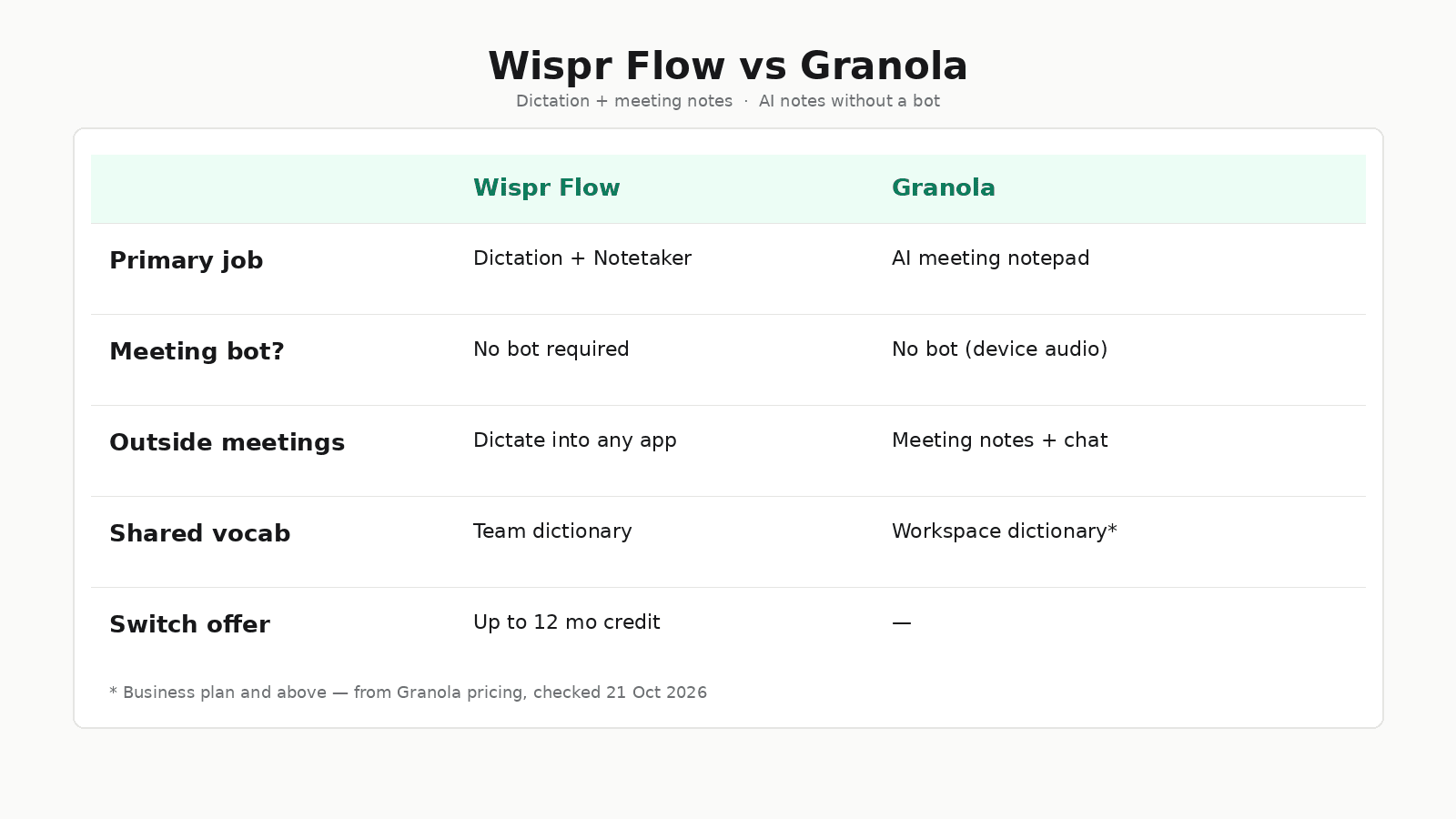
Fair comparison table
Sources: Granola pricing and homepage, Wispr pricing, and Wispr's Granola switch page, all checked 21 October 2026. Plans change — verify before you buy.
| Wispr Flow | Granola | |
|---|---|---|
| Primary job | System-wide dictation + Notetaker | AI meeting notepad |
| Meeting bot | Markets capture without a typical in-call bot (per switch page) | Bot-free device-audio capture |
| Outside meetings | Dictate into any focused text field | Notes, chat and memory centred on meetings |
| Shared terminology | Shared dictionary on team-capable plans | Workspace-wide dictionary on Business+ |
| Free tier (checked date) | 2,000 words/week desktop, 1,000 mobile | Basic $0 with 30 days of accessible history |
| Individual paid (checked date) | Pro $15/user/mo ($12 annual) | Business $14/user/mo |
| Higher tiers | Growth / Enterprise (admin, SSO, HIPAA options on Wispr's page) | Enterprise from $35/user/mo (SSO, admin, HIPAA workspaces) |
| Switch / migration | Import exported Granola notes; credit offer for eligible paid Granola | History stays in Granola unless you export |
Pricing snapshot (21 October 2026)
Granola
From granola.ai/pricing:
| Plan | Price | Notable limits / extras |
|---|---|---|
| Basic | $0 / user / month | AI meeting notes; 30 days of meeting history in the app; Slack; shared folders; templates |
| Business | $14 / user / month | Unlimited history; advanced models; Notion / HubSpot / Attio / Affinity / Zapier; MCP; API; centralized billing |
| Enterprise | $35 / user / month | SSO, SCIM, admin controls, org-wide training opt-out, HIPAA-compliant workspaces |
Granola's docs also note billing per workspace and that mobile note-taking apps are free to use without a paid subscription (subscriptions and billing).
Wispr Flow
From wisprflow.ai/pricing (same figures as in my Wispr review, refreshed 10 October 2026; re-check if you need exact current numbers):
| Plan | Price | Notable extras |
|---|---|---|
| Free | $0 | Weekly word caps on desktop and mobile |
| Pro | $15 / user / month ($12 annual) | Unlimited dictation; shared dictionary and team workspace |
| Growth | $23 / user / month ($18 annual) | Admin controls, unlimited Notetaker, SSO, org-wide HIPAA with BAA |
| Enterprise | Contact sales | SCIM, MDM, admin seats |
Wispr's "switch from Granola" offer
Checked on wisprflow.ai/granola-switch on 21 October 2026:
- Switch to Wispr and they cover remaining paid Granola time with Wispr credit, plus up to three bonus months.
- Up to 12 months total.
- Framed as meeting notes and everyday voice dictation on one subscription.
- Claimed extras vs Granola on that page include transcript refinement, local recording when the connection drops (desktop meeting capture), back-to-back meeting handling, dictionary across dictation and notes, dictation outside meetings, and import of exported Granola notes / summaries / transcripts.
- Process: submit email → verify Granola subscription → start using Wispr while they review.
- Fine print on the page: eligible individual paid Granola plans; verification required; credit based on paid time remaining when Wispr credit starts; up to 12 months total.
Affiliate link for this article (lands on that switch page): Wispr Flow Granola switch offer.
Check current switch terms on Wispr — offer details can change; the date above is when this article checked them.
What this comparison is based on
Wispr Flow — first-hand. About two years of daily use. Team plan, shared dictionary, Notetaker for meetings, dictation into Claude Code all day. Honest complaints (no live transcript while speaking; always cloud transcription) are in the full Wispr Flow review.
Granola — documented product. Features, pricing and the bot-free positioning above come from Granola's site and docs (checked 21 October 2026), and from how Wispr describes the overlap on the switch page. I am not claiming a personal Granola trial here. If meeting-note quality is your undecided variable, run the same week of calls on each tool and compare your own notes.
AI meeting notes without a bot
Both products pitch notes without putting a bot in the participant list. That search intent ("ai meeting notes without a bot", "granola vs wispr notetaker") is real: many teams dislike visible notetaker bots on customer calls.
Granola's whole product is that workflow — notepad UX, briefs, chat over the archive, integrations out to CRM and Notion on Business+.
Wispr's pitch on the switch page is "meeting notes and everyday voice dictation" as one subscription. If half your voice use is not in a meeting, that is the gap Granola does not try to fill the same way — and it is the gap I actually live in with Wispr.
For long recordings and podcasts rather than live meetings, I use different tools — including Podskrift when the job is getting a transcript out of a published episode. Meeting notetakers and podcast transcription are related problems with different inputs.
Who should pick which
Stay on Granola (or start there) if:
- meetings are the product, and you want a notepad built around that archive
- you care about Granola's Business integrations (Notion, HubSpot, Attio, Affinity, Zapier, MCP, API) as listed on their pricing page
- you do not need system-wide dictation into a terminal or every text field
Choose Wispr Flow (or switch) if:
- you already dictate (or want to) into Claude Code, Slack, email and docs between calls
- a shared team dictionary across dictation and notes matters
- you are on an eligible paid Granola plan and the switch credit maths work for you after you read the live terms
Try both if:
- meeting-note quality is the undecided variable — run the same week of calls on each and compare your own notes, not a blog table
For my own stack the answer is already Wispr: I need the dictation half of the week as much as the meeting half, and the Team plan shared dictionary is why I stay. Someone whose week is mostly meetings and CRM follow-ups should weight Granola's specialist notepad more heavily than my workflow does.
Verdict
For "granola alternative" and "switch from granola," Wispr is a credible option when you want dictation outside meetings on the same bill, and their switch credit (up to 12 months total, with the caveats above) lowers the cost of trying that. For "best AI meeting notepad, full stop," Granola remains the specialist on paper — judge it on its own pricing page and a real trial, not on affiliate framing.
I would not bid on the Wispr brand as an affiliate promise; this is an editorial comparison with disclosed links.
See the Granola switch offer on Wispr Flow if you are evaluating a move. For day-to-day dictation without the switch angle, start from the Wispr Flow review.
FAQ: Wispr Flow vs Granola
Is Wispr Flow a Granola alternative?
For bot-free meeting notes, both are in the same conversation. Granola is built as an AI notepad for meetings. Wispr Flow is built as system-wide dictation with a Notetaker on top. If your main job is meeting memory, Granola is the specialist. If you also dictate into terminals, Slack and docs all day, Wispr covers more of the week.
Can I switch from Granola to Wispr Flow for free?
Wispr's Granola switch page (checked 21 October 2026) says they cover remaining paid Granola time with Wispr credit, plus up to three bonus months, for up to 12 months total — for eligible individual paid Granola plans, with verification. Confirm the current terms on that page before you rely on them.
Does Granola join meetings as a bot?
No. Granola markets bot-free capture from your device audio for Zoom, Google Meet, Teams and other apps (Granola).
Does Wispr Flow join meetings as a bot?
Wispr markets meeting capture without the usual "bot in the call" pattern on their Granola switch comparison. I use Wispr's Notetaker on the Team plan for meetings; see my Wispr Flow review for how I use dictation day to day.
Granola vs Wispr notetaker — which is better for meeting notes only?
If you only need meeting notes and chat over that archive, start with Granola's pricing and feature set. If you want the same subscription to also type into every other app by voice, evaluate Wispr. A fair note-quality call is a week of your own meetings on each tool — not a table on a blog.
Stay in the loop
Productivity tips, tool reviews and early access to new products, straight to your inbox.