WordPress to Next.js Migration: 11 SEO Traps a Green Check Missed
On this page
A WordPress to Next.js migration keeps its rankings only if every indexed page stays the same for Google: title, meta description, robots directives, Open Graph, structured data, headings, and the rel on outbound links. Matching URLs and status codes is not enough.
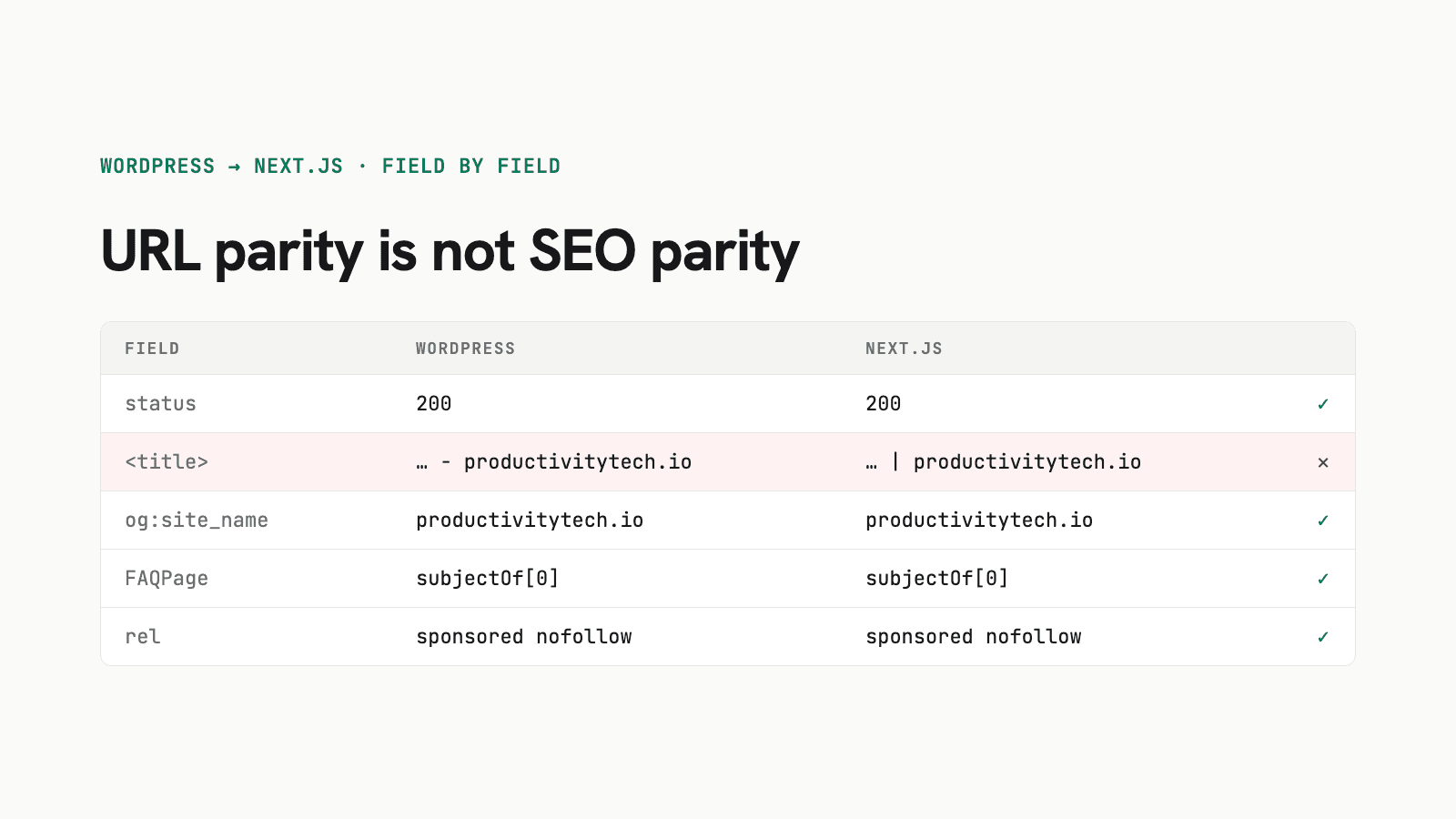
I learned that this week moving productivitytech.io off WordPress. My URL check was 76 of 76 green. At the same time, 26 of 32 pages had a different <title> than the live site, and nothing I had built noticed. Below are the 11 SEO traps I caught before the DNS switch, and the checklist I now use.
Why I Left WordPress for Next.js and Markdown
I never opened the WordPress editor. Every post on this site was written with Claude Code and published over SSH with WP-CLI. That made the CMS a middleman with its own failure modes:
- Rank Math's sitemap froze. In July, 14 of 17 published posts were missing from the sitemap. On migration day it had happened again: the three newest posts were missing.
- KSES stripped markup unless the command ran as an admin user.
- Category IDs needed a special flag, or WP-CLI treated them as names.
- Block validation. Raw HTML became a Classic block, so every post needed a conversion step.
The site now runs on Next.js 16. Posts are Markdown files in git, pages are static, and Vercel deploys when a pull request is merged. Publishing a post is now one pull request.
This is my second try. An earlier Next.js version with Sanity as CMS stalled in January. The CMS layer was the problem, not Next.js. This time there is no CMS at all.
URL Parity Is Not SEO Parity
Most migration guides stop at "keep your URLs and add 301 redirects." That part is necessary and easy to test. I had a script that checked all 57 WordPress URLs (live pages, sitemap entries and old URLs from Search Console) plus the heading anchors Google had indexed. It went green quickly.
The rankings, though, depend on what Google reads on the page. So I added a second script that compares every indexable page field by field against the frozen WordPress version:
| Field | Why it matters |
|---|---|
<title> and meta description | What searchers see in the results |
| Robots meta | max-image-preview:large affects image results |
| Open Graph and Twitter tags | Link previews, social shares |
| Every JSON-LD type, including nested ones | FAQ and article rich results |
| FAQ questions and answers, word for word | Must match visible text |
| H2/H3 in order, word count, image alt text | Content parity |
rel on external links | Affiliate and sponsored-link compliance |
Two rules made the difference. First, prove the audit can fail: I ran it against a build with indexing turned off, and it reported 4 of 32 pages passing, with 28 robots failures. Second, use two independent instruments. The trap that hid 26 changed titles only showed up in the second one.
The 11 SEO Traps
1. Rank Math's Title Template Varied Per Post
My new site added | productivitytech.io to every title. Rank Math had used |, - or no suffix at all, depending on the post. My own audit stripped the suffix before comparing, so it reported 32 of 32 identical. A second tool that compared raw values found 26 changed titles.
Fix: store the exact WordPress <title> for every post during export and render it verbatim. Never normalize a field that Google shows in the results.
2. HTML to Markdown Dropped rel="sponsored nofollow"
The converter kept link text and URLs but lost the rel attribute. Three Setapp affiliate links in my Setapp review would have gone live as plain followed links. Fix: keep any <a> with a rel as raw HTML in the Markdown.
3. The FAQPage Schema Was Nested
Rank Math does not put FAQPage at the top level of the JSON-LD graph. It sits under BlogPosting.subjectOf. A top-level search found zero FAQ blocks and would have concluded nothing was lost. Fix: walk the entire graph recursively when you compare schema types.
4. Rank Math Had Stripped Unicode Escapes
Some FAQ answers on the live site showed u002du002dfrom where the text should read --from. Rank Math had stored - and lost the backslash. The export copied the damage. Fix: decode those sequences in the export and compare against the decoded WordPress text.
5. Hex Entities Leaked Into JSON-LD
The Markdown pipeline (rehype-stringify) writes & as &. Copied into FAQ schema, the answer text contained literal entities. The fix is a small decoder that runs before any text goes into structured data:
return html
.replace(/<[^>]+>/g, ' ')
// rehype-stringify emits hex references (&, <) as well as named ones
.replace(/&#x([0-9a-f]+);/gi, (_m, h) => String.fromCodePoint(parseInt(h, 16)))
.replace(/&#(\d+);/g, (_m, d) => String.fromCodePoint(Number(d)))
.replace(/</g, '<').replace(/>/g, '>').replace(/"/g, '"').replace(/&/g, '&')6. Next.js Replaced the Layout's Open Graph on Every Page
The Next.js metadata docs say metadata is merged shallowly. An openGraph object on a page replaces the layout's openGraph entirely. og:site_name and og:locale were gone from every subpage. Fix: one shared constant spread into each page:
export const OG_DEFAULTS = { siteName: 'productivitytech.io', locale: 'en_US' } as const

export const metadata: Metadata = {
  openGraph: { ...OG_DEFAULTS, type: 'website', url: '/products/' },
}
7. Robots Directives Were Missing
Rank Math sends index, follow, max-snippet:-1, max-image-preview:large, max-video-preview:-1. A plain Next.js site sends nothing, which is not the same thing for image previews. Copy the directive string, but only when the site is live (see the flag below).
8. Google Had Indexed #heading-N Anchors
The old theme gave every H2 and H3 an id like heading-3 with JavaScript. Search Console showed 14 of those fragment URLs for my Chrome remote debugging guide alone, the page with most of this site's search visibility. The new renderer assigns the same ids in document order. One post had a duplicate body <h1> that would have shifted every number by one, so I removed it.
9. GitHub-Flavored Markdown Autolinked Plain Text
GFM turns anything that looks like a URL into a link. 127.0.0.1:9222 in a troubleshooting section became a clickable link that WordPress never had. Fix: a small remark plugin that unwraps links whose text is the URL itself, where the source had none.
10. The Schema Headline Used the SEO Title
Rank Math sets BlogPosting.headline to the SEO title, not the visible post title. My first version used the visible one. Fix: headline = seoTitle ?? title.
11. The Author Name Was Guessed
The first build guessed my surname and got it wrong in the byline and in the Person schema. Fix: read the author from the WordPress page (twitter:data1 or the Person node), never from something that looks close enough.
Traps Outside the Page
Five more issues had nothing to do with page content:
- The redirect list from Search Console was incomplete. Reading Rank Math's redirection table directly over SSH found a 410 for
/privacy-statement-eu/with 55 hits that no other list had. - Other services shared the same server block. Five MCP servers, including my Garmin MCP server, ran behind private paths on the WordPress host. Moving the A record would have cut them off. They now run on their own hostname, and the Next.js app proxies the old paths there.
- An old Vercel project had stale domain settings. The abandoned Sanity attempt still redirected the apex domain to
www. Check each domain's redirect setting before you switch. - An expired certificate on the Vercel domain can give a few minutes of TLS errors at cutover. Test routing first with
curl -k --resolve productivitytech.io:443:216.150.1.1 https://productivitytech.io/. - The production build answers on
*.vercel.apptoo. Indexing, robots meta and analytics are behind an explicitSITE_LIVE=1flag, not justVERCEL_ENV=production.
WordPress to Next.js Migration Checklist
Run this before you touch DNS:
- Freeze WordPress. Snapshot every URL, status code, redirect and on-page field while WordPress still serves the domain. After the switch, you can only compare against the snapshot.
- Export exact values. Title tag, meta description, author and
relattributes come from the rendered page, not from templates. - Check URL parity. All live, sitemap and Search Console URLs, 301s, 410s and indexed anchors.
- Check SEO parity field by field on a build with the live flags on.
- Run a negative control that must fail, and a second independent tool that compares raw values.
- Map everything else on the host: proxied services, cron jobs, webhooks, hardcoded base URLs.
- Keep WordPress running untouched as a rollback. Watch Search Console for two to four weeks.
What It Took
The code, the content export and the parity scripts took one working day with Claude Code: 24 commits and six merged pull requests from the first commit to the live site. I spent about as much of that day proving parity as building. Every trap above was a separate fix, and most were one or two lines once found.
The site went live on Vercel the same afternoon. WordPress is still running on the old server as a rollback. What I cannot verify yet is ranking impact. That takes weeks of Search Console data, and I will update this post when I have it.
If you publish with AI agents already, the question is not whether Next.js is better than WordPress. It is whether the CMS still does anything for you. For me it did not. If you want to see how the rest of that setup works, start with my Claude Code automation guide.
FAQ: WordPress to Next.js Migration
Will I lose SEO if I migrate from WordPress to Next.js?
Not if every URL, redirect and on-page signal stays the same. Rankings drop when titles, descriptions, schema, robots directives or internal anchors change by accident. Compare each indexed page field by field against the WordPress version before you switch DNS.
How do I keep Rank Math titles and meta descriptions in Next.js?
Export the exact title tag and meta description from each live page and store them in the post frontmatter. Do not rebuild titles from a template: Rank Math templates often vary per post, so a single suffix changes titles that Google already shows.
Does Next.js merge Open Graph metadata from the layout?
No. Next.js merges metadata shallowly, so an openGraph object on a page replaces the one in the layout. Fields like og:site_name and og:locale disappear unless you spread shared defaults into every page.
How long does a WordPress to Next.js migration take?
For a 23-post blog, the code and content export took one working day with Claude Code. Proving SEO parity took as long as the build itself. Keep the old WordPress install running as a rollback for at least two to four weeks.
What should I check after switching DNS?
Run the same parity checks against the live domain using a frozen snapshot of the old site, confirm the sitemap lists every post, and watch Search Console for two to four weeks. Rankings and recrawl cannot be verified before the switch.
Stay in the loop
Productivity tips, tool reviews and early access to new products, straight to your inbox.